Virtual storage is when you combine multiple drives into one to increase performance and storage. This is mainly used in enterprise level when a single drive is not sufficient enough for multiple people accessing one file at a time. However, building a network-attached storage device (NAS) is very expensive so bringing multiple devices together and treat it as one drive is better. This is known as virtual storage.
Data Striping – When data such as a file is split into blocks and stored across multiple drives.
Redundant Array of Independent Disks (RAID):
This is one of the most common types of virtual storage. It can be used with both SSDs and HDDs to bring multiple drives together as one. NAS’s will commonly support multiple drives in RAID form. Multiple hard drives can be brought together to improve performance and reliability. This is known as RAID.

RAID Models:
RAID 0 – Striped: This provides improved performance and additional storage by taking data and seperating it into blocks and spreading them across multiple drives.. However, it does not take well to errors so any errors would destroy the data stored.

RAID 1 – Mirrored: Each drive has the same information written to it so it provides some tolerance. Because data is repeated, storage available is halved and write speed is decreased. But read speed is increased.

RAID 5 – Striped Parity: This requires multiple discs in the array and provides fault tolerance and parity checks and error corrections. The parity information is stored on a single drive, so the other drives can continue working if one drive fails. The data lost can be calculated using the parity data stored on the parity drive.
Storage Area Network (SAN):
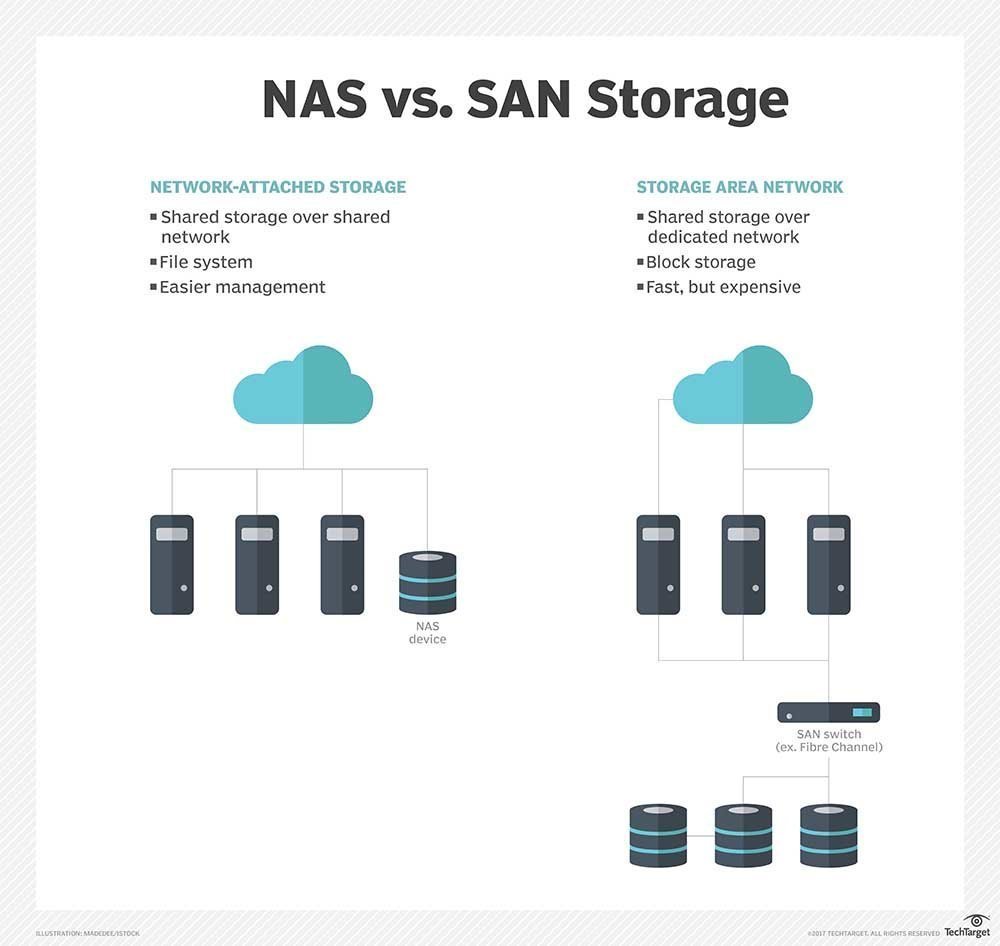
Although RAID offers good storage solutions for most small networks, storage area networks offer more features and much greater scalability. Basically, a SAN acts as a gateway to a series of block devices, such as RAIDs, and brings them together.
A SAN network can be seen as a small section of a network that is only responsible for serving files.
A key difference between RAID/NAS and SAN is that NAS is a single device connected to the local area netwrok (LAN) whereas NAS is a server that connects multiple storage devices together to improve performance and latency.
NAS stores data in file level, which means it is accessed in bulk, decreasing performance. In a SAN, data is stored in block-level meaning each sets of data is stored as one block with a given identifier and the system doesn’t have to look through every bit of data to find the desired file it just looks for a specific identifier.
Cloud Storage:
Cloud storage is a service in which data is stored and maintained by a cloud storage service provider. It is accessed through the internet. Generally, users pay for the storage that they take up, on a subscription basis.
 Computer Science Notes