Machine Code Instructions:
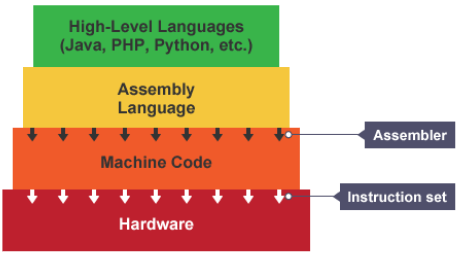
When we write code in a language such as python, this is readable and understood by us humans. This is known as source code. Processors can’t understand this source code so it needs to be translated into machine code. A compiler is any program that takes source code and translates it into machine code.
Source code allows software to be created without needing to understand the complex workings of a processor. The programming language hides lots of the complexities of a processor.
Each processor architecture, e.g: ARM or x86, has its own set of opcodes (instructions). The compiler must know the architecture of the processor before beginning to compile as different processors are not compatible with certain computers. Each line of source code can equal many lines of machine code.
Machine code is a binary representation of a set of instructions, split into opcode and operand (instruction’s data).
Assembly language uses text to represent machine code instructions, or mnemonics.
Each processor architecture has a set of instructions that it is able to run. This is known as an instruction set. Despite differences between instruction sets, machine code holds a common structure.
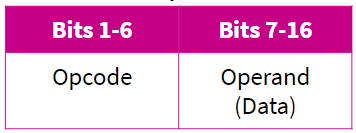
Opcode: Operation code
This is the instruction that needs to be performed.
Operand:
This specified the data that needs to be acted on and the location of it.
How The CPU Works:
Fetch: The next instruction is fetched from Main Memory.
Decode: The instruction gets interpreted/decoded, signals produced to control other internal components (ALU for example).
Execute: The instructions get executed (carried out)
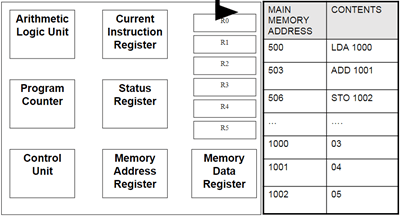
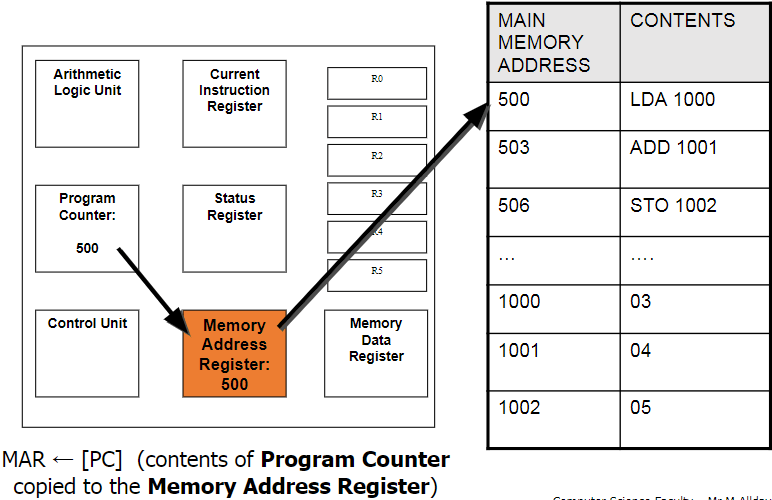
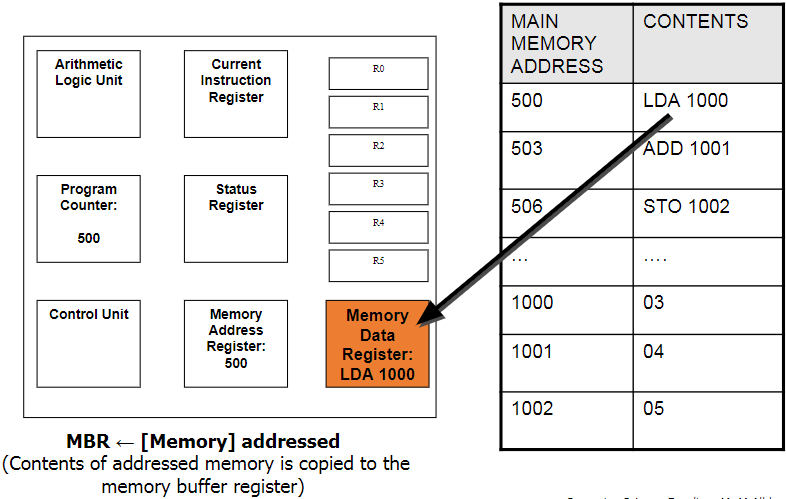
PC → MAR → MDR → CIR
Program Counter (PC):
This holds the address for the next instruction that is to be Fetched-Decoded-Executed. This will increment automatically as the current instruction is being decoded to point to the next address. Also known as the address pointer.
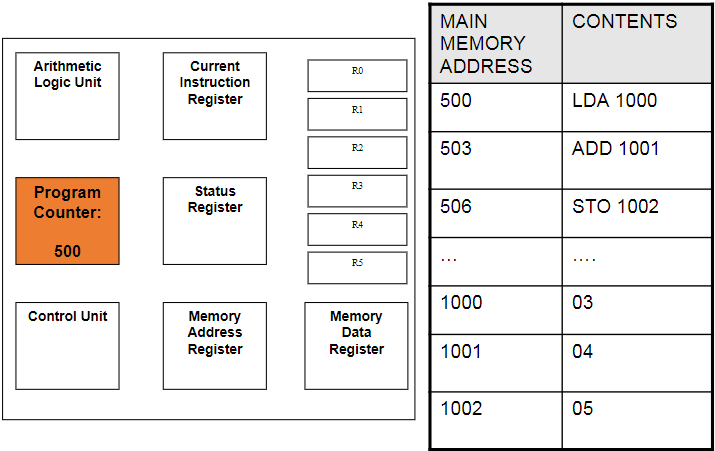
Memory Address Register (MAR):
This holds the address of the instruction that is currently being executed. It points to the location in the memory where the needed instruction is being stored. The next address is copied from the PC.
Memory Data Register (MDR):
This is where the data/instruction from the address given by the MAR is fetched and stored, until it is ready to be sent over to the CIR to be decoded and executed.
Current Instruction Register (CIR):
This is where the current instruction is being stored while it is being decoded and executed. While this is happening, the next instruction is being fetched into the MDR.
Control Unit (CU):
This coordinates all the Fetch-Decode-Execute activities that are happening. At each clock pulse it controls the movement of data and instructions between the registers, main memory and input and output devices. Some instructions take less time than a single clock cycle but the next one can only start when the next cycle is executed.
Status Register (SR):
This stores a combination of bits used to indicate the result of an instruction. For example, one bit will indicate an overflow, another bit will indicate a negative result. It also indicated whether an interrupt has been received.
Arithmetic Logic Unit (ALU):
This carries out arithmetic and logical operations that are required. Basically performs the calculations and makes logical decisions.
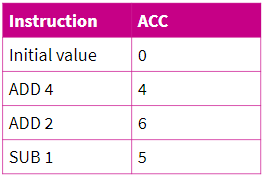
Accumulator (ACC):
Any instruction that performs a calculation makes use of this. Many instructions operate in the ALU on this and the result is stored on the ACC. The calculations take a step-by-step approach so the result of the last calculation is part of the next one.
Jump Instructions:
These are used to jump to the specified address and continue from there if a certain condition is met. If not, then it will continue on as normal. For example, the instruction can specify that if the result in the ACC is positive, jump to a certain address.
Bus:
This is a path down which information is passed down. There are 3 main types: Data bus, Address bus, and Control bus.
Data Bus: This is used to transfer data that needs to be transferred from one part of the hardware to another.
Address Bus: This contains the address location of where the data bus should transfer the data to. The address and data travel together until the address is reached.
Control Bus: This is what the control unit uses to send out the commands to different components.
Common CPU Architectures
Von Neumann architecture:
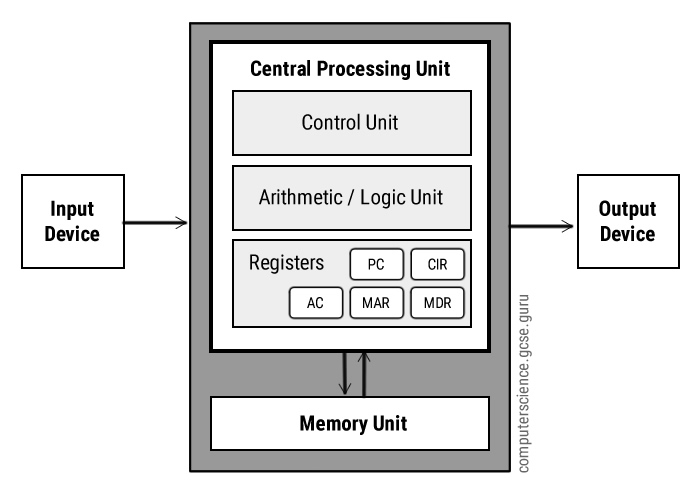
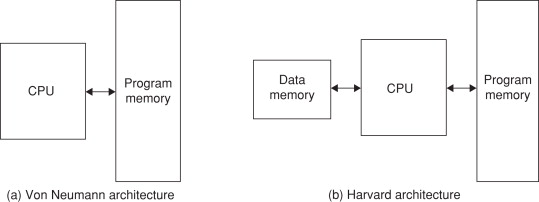
This is a CPU architecture developed by John Von Neumann in 1945. It is based on the stored program computer concept where data and instructions are stored in the same memory unit. This also means that there is only 1 bus connecting data and instructions to the CPU. This creates the Von Neumann bottleneck, which is where instructions can only be carried out one at a time. The bandwidth of this bus plays a large part in the performance of a CPU with the Von Neumann architecture. Cache also plays a part as more cache means more data can be stored in the CPU so the bus is not needed for frequently used programs. Also CPU’s need 2 clock cycles to complete an instruction as instructions/data have to be moved to and from the memory unit along the same bus.
These processors are usually used in computers and similar devices.
Harvard architecture:
This was developed by Harvard Mark in 1939. It is similar to the Von Neumann architecture but it has 2 different memory units to store data and instructions so it has 2 separate buses for sending and receiving data and instructions. This removes the Von Neumann bottleneck and also takes only 1 clock cycle to complete an instruction. However the design and cost is more complex and expensive as it requies an additional bus and memory unit over the Von Neumann architecture.
These processors are usually used in smaller scale devices such as microcontrollers, signal processing and alarms.

Multicore System:
Before multiple cores, scientists used to add more and more transistors onto the CPU’s to improve performance. Now we have got to the stage where we can not physically fit anymore transistors onto the CPU. Then we started putting more cores into the CPU to improve performance.
Parallel system is a CPU that has more than one processing core. In a parallel system, 2 or more cores work simultaneously to perform a single task. Tasks are split into smaller sub-tasks to be shared out among the cores which hugely decreases the time taken to execute a program. E.G: One core can fetch, another can decode and the other can execute the data.
Parallel systems are usually places into 1 of 3 categories:
- Multiple instruction, single data (MISD) systems have multiple processors, with each processor using a different set of instructions on the same data set. E.G: Space Shuttle Flight Control Computers.
- Single instruction, multiple data (SIMD) systems have multiple processors that follow the same set of instructions, with each processor taking a different set of data. They process lots of different data simultaneously, using the same algorithm. E.G: Weather Forecasting
- Multiple instruction, multiple data (MIMD) systems have multiple processors, with each processor able to process instructions independently of each other. This means a MIMD system can process a number of different instructions simultaneously. E.G: Flight Simulators.
All the cores in a parallel system need to constantly communicate with each other to ensure that changes in the data of one core is taken into account in the calculations happening in other cores.
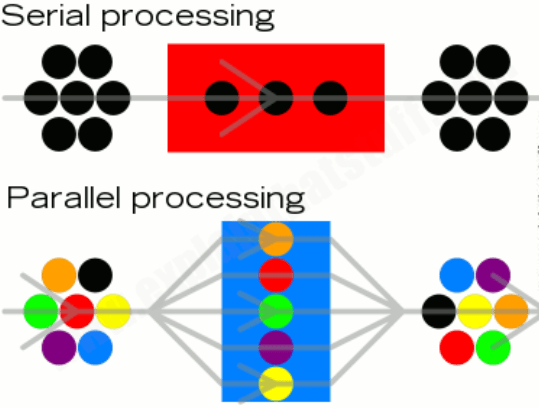
At the start of parallel systems the complexity of splitting instructions up to multiple cores to process meant that it was still quicker to use a single core to process an instruction as it needed to split the workload and combine the results at the end. However, programmers have become more adept at writing software for parallel systems and have since made it more efficient.
Co-processing:
Another way of implementing multiple cores is by using a co-processor. This involves another additional processor to the system which is responsible for a specific task, such as graphics card.
GPUs:
This is a type of processor that is dedicated to handling complex calculations needed for graphics rendering. This is a common example of a co-processing system. GPU’s are usually located on a separate graphics card that requires their own heat sink to function properly. Popular examples of GPU manufactures include nVidia and ATI, each having their own hardware design and specialist programming techniques to ensure best performance.
A GPU is a form of co-processor and is used with the CPU to accelerate performance of applications. For example,the compute-intensive part of an application is offloaded to the GPU to decrease the CPU’s workload. This significantly improves performance of the system.
The quality and performance of the GPU varies hugely. For example integrated graphics chip that you could find in a notebook could run lighter applications such as Microsoft Word well but would struggle to handle more complex tasks such as games.
As GPUs have become more powerful, they are used in an increasing number of different areas other than gaming. From scientific research to financial modelling.
Task: Investigate the factors affecting the performance of the CPU, including clock speed, number of cores, cache.
Clock speed this determines the number of cycles per second that a processor goes through. The higher this number is, the more instructions the CPU can complete per second. These days processors can easily reach up to 4 GHz meaning they can perform up to 4 billion instructions per second on one core. Increasing clock speed can improve overall load times and responsiveness.
Number of cores determines the number of instructions that can be executed per cycle. If you had one core then only one instruction can be decoded and executed per cycle but if you had 4 cores (quad core) then it enables 4 instructions to be decoded and executed per cycle. This can greatly improve performance when you are using multiple programs simultaneously.
Cache in the CPU holds data/instructions from programs that are used frequently. When program data gets stored in the cache it greatly increases the load time when you open it again. However cache is very expensive which is why there is usually so little available. This improves performance of frequently loaded programs but it is volatile so only until you power your PC off.
REDO:
One factor that affects CPU performance is Clock Speed. This determines the number of clock cycles per second that the processor executes. The higher this number is, the more instructions that the CPU can potentially execute per second, as some instructions may take longer than a single cycle. Increasing clock speed can improve overall performance and responsiveness of your device. This means that programs load up quicker and elements inside the program will respond quicker. E.G: The time it takes for a menu to come up when you click on it. However, increasing clock speed too much will have the downside of high temperatures and possibly instability. This means that your CPU will put out more heat energy the higher your clock speed is which may introduce thermal throttling so the benefit of overclocking the clock speed would be nothing and you would be just left with higher temperatures. Overall a higher clock speed, to a certain extent, is beneficial to the performance of your device but in modern CPU’s, increasing clock speed won’t have a noticeable performance gain unless you are doing professional work.
Another factor is the number of CPU cores. The number of cores determines how many instructions your CPU can execute per cycle. If you had one core then only one instruction can be decoded and executed per cycle but if you had 4 cores (quad core) then it enables the CPU to decode and execute up to 4 instructions per cycle. The number of cores can greatly improve performance when using multiple programs at once. For example, if you had multiple tabs open in a browser it would have better performance with multiple cores as one core can only handle one data stream at a time. However, the down side to more cores is that they are usually more expensive than lower core counts and consume more power. Overall, CPU cores have a large impact on multi-tasking performance, but if you only use few programs at a time, it could be better to opt for a lower core count to save money.
Another factor affecting CPU performance is cache. Cache holds the data/instructions from programs that are used most frequently so they are quick to access. When instructions/data from a program gets stored in cache, it greatly increases the responsiveness and load time of the program when you next open/interact with it. This can greatly improve performance if you use a program freqently. The more cache the CPU has, the less time the computer spends requesting data from slower main memory and as a result programs may run faster. A good example is when you are browsing the internet in a browser. Previous web pages are usually stored in the cache, which is why it loads very quickly if you go back to it. However, cache is very expensive which is why there is usually very little available in the CPU. Overall, cache greatly improves system performance as it holds data inside the CPU so frequently requested instructions/data can load up quickly, irrelevant of RAM and HDD performance but at the cost of high prices.
 Computer Science Notes