A database is data that is stored in an organised, structured way. E.g: your contacts are in alphabetical order.
Key Terms:
- Table = Made up of Rows and Columns.
- Field = Column
- Record = Row
- Entity = An element that is being recorded in the database.
- Primary Key = Unique identifier for each record.
- Foreign Key = The element that links in the join table. Can’t have a relational database without this.
- Composite Key = When you combine more than 1 (usually 2) field to create a primary key.
- Candidate Key = An element that could possibly be a primary key. We choose between these to be a primary key.
- Secondary Key = A non-unique identifier. Makes searches faster.
- Queries = A way to retrieve a certain set of data according to the specified criteria.
- Form = A way to create a UI (user interface) containing input boxes to input data easier.
- Report = Visualized form of queried data.
- Flat File Database = When there is only one table in a database.
- Relational Database = When there are multiple tables for each element to reduce data redundancy.
- Data Redundancy = When data is repeated, making it unorganized and inefficient to search a query.
- Data Integrity = The accuracy, completeness, and consistency of data and no redundancies. Also making sure data is secure.
- Referential Integrity = The accuracy and consistency of the data in tables, making sure they are all valid and complete, eliminating data redundancy by creating relationships with foreign keys. (how to make data integrity)
Validation: Data types, Field Size, Required, Drop-down List, Input Mask.
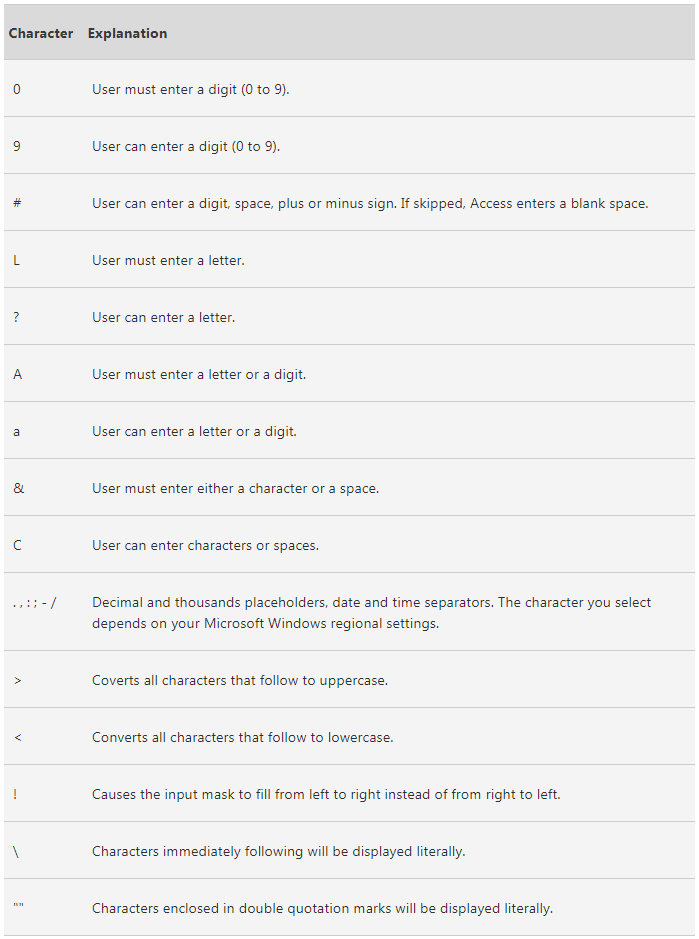
Validation vs Verification:
Validation is an automatic computer check to ensure that the data entered is sensible and reasonable. It does not check the accuracy of data.
Verification is performed to ensure that the data entered exactly matches the original source.
| Types of validation checks | Description | Example |
| Presence Check | Checks if data has been entered into the field. | It will not work if a field has been left blank. |
| Type Check | Checks if there are no forbidden types of characters. | If you made a field a numeric only field, it will check if there are letters. |
| Format Check | Checks the data is in the correct format | Input Mask |
| Length Check | Checks that the data is the right length | A password needs to be 8 letters long. |
| Range Check | Checks if a value falls into a specific range. | Working hours are between 0-50 hours a week. |
| Check Digit | The last one or two digits in a code is obtained from a calculation from the previous values. The computer performs this calculation and sees if it matches the end value. | Bar code readers use this. |
| Spell Check | Looks up words in the dictionary to check the spelling of words. | Notifies if there is a wrong spelled word. |
| Lookup Table | When a field contains a limited list of items then this can reduce errors. | a shop will put clothes size in a lookup list. |
Database relationships:
1:1 – one to one
1:M – one to many
M:M – many to many (shouldn’t do many to many relationships)
M:M relationships affects the integrity of the data.
To get rid of many to many relationships, you put an extra table (Join Table) in between to link them together indirectly.
ACID – Atomicity, Consistency, Isolation, Durability.
These are a set of properties to ensure the integrity of the database is maintained always.
Atomicity:
This requires that a transaction is processed in its entirety or not at all.
In any situation, such as power cut or hard disk failure, it is not possible to process only part of the transaction.
Consistency:
This ensures that the transaction can not violate any of the defined validation rules.
Referential integrity is always upheld.
Isolation:
This ensures that concurrent executions of transactions leads to the same result as if they were processed one after the other. This is crucial in a multi user database.
Durability:
This ensures that once a transaction has been committed, it will remain so, even in the event of a
power cut.
As each part of the transaction is complete, it is stored in the buffer on the disk until all elements are complete. Only then will changes to the database be made.
Normalisation:
This is the process taken to create the best possible design for a database. Tables should be organised in a way that there is no data redundancy. This allows for complex queries to be made. there are 3 stages in normalisation: First Normal Form (1NF), Second Normal Form (2NF), Third Normal Form (3NF).
First Normal Form:
- A table is in the 1NF when there are no repeating attirubtes.
- All attributes must be atomic. A single attribute cant consist of 2 data items such as firstname and surname. This would make it impossible to sort on surname.
To put in 1NF you would create a link table to get rid of data redundancy.
Second Normal Form:
The table must already be in 1NF and have no partial dependencies.
A partial dependency is when a table has a composite key (2 attributes that make up a primary key) and an attribute in that table only relies on one part of the composite key.
Third Normal Form:
The table must already be in 2NF and have no non-key dependencies.
 Computer Science Notes