Paging:
Paging is when main memory is divided into fixed size blocks called page-frames and programs are divided into blocks of the same size called pages. Pages are swapped between secondary storage and page-frames as necessary.
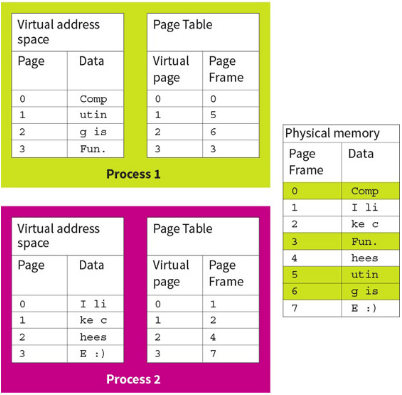
Each process has its own view of pages and each memory access is made up of two parts: the page number and the offset within that page.
All processes use a virtual memory space and aren’t aware where their pages are physically stored. They are also unaware of other processes and where their pages are.
Processes use their own memory address space, known as the logical address space. It is the job of the memory management unit to translate the addresses.
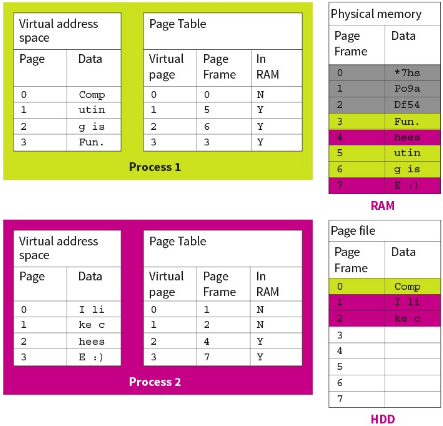
Example:
Here, there are 2 processes, each with their own virtual memory space. The page table translates the virtual page number to where it is held physically in the memory. The program sees memory as a continuous block, as it is in the virtual memory, but not in physical memory. It relies on the page table to translate it.
If the process tries to access addresses outside its paging table, an error occurs.
Segmentation:
This is where main memory is divided into variable sized blocks called segments where each segment corresponds to a program routine or a data structure/array.
Segmentation is an alternative way of allocating memory to processes, where segments are variable sized rather than fixed. Therefore, they can request the exact size needed in the memory instead of forcing data into fixed sized chunks. This is ideal to store blocks of code, such as a library, or files where the size is not known in advance.
In order to store different sized segments, the memory manager needs to store the length of each segment in a segmentation table.
Each segment is protected so only routines with the right “permissions” can access the data within.
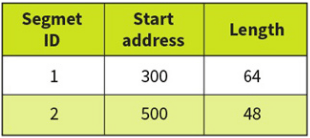
The segments may be placed anywhere in the main memory, but the instructions and data in any one segment are contiguous(next to each other). When a different program routine or data is needed it is loaded as a segment.
Modern OS’s use a combination of paging and segmentation in their memory management.
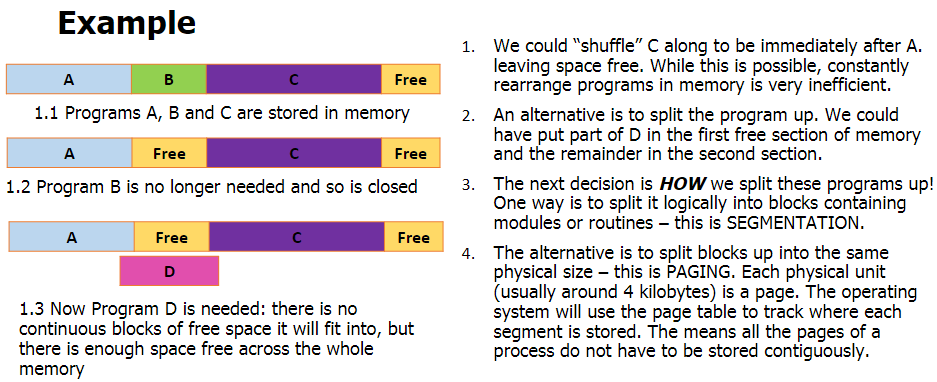
Paging VS Segmentation:
In practice, paging is actually a type of segmentation.
Similarities:
- Allow programs to run even when there is not enough physical memory space.
- Provides a means by which only part of the program needs to be in the memory.
- Split programs into blocks which are stored on the disk.
- Split memory into blocks.
- Swaps segments and pages between disks and memory when necessary.
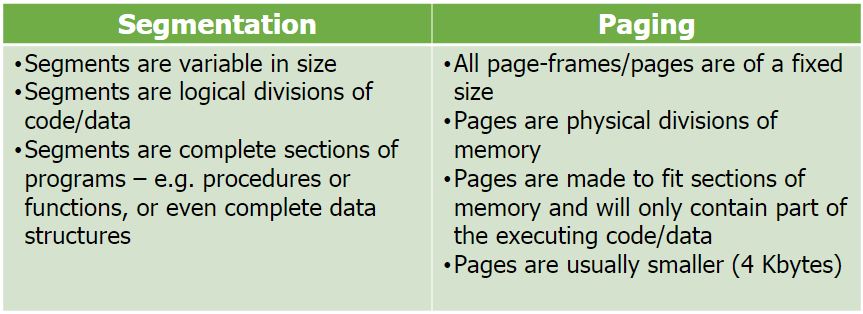
Differences:
Virtual Memory:
Virtual memory is when the computer uses secondary storage (e.g: hard drive) to simulate additional main memory to overcome the limitation of physical memory capacity.
For example, this can be done when the computer sees that a page has not been used in a while so it moves it to the virtual memory to free up some space in the main memory.
In the hard drive, pages are stored in a special file called the page file. When a page is moved over, the memory manager takes note on what pages are in the page file and the page number to locate them in the future.
Essentially, virtual memory extends main memory to allow programs to run even when there isn’t enough physical main memory available, at the cost of performance.
However, programs are not able to run while in the virtual memory as they are in a suspended state. They need to be swapped back into the main memory to begin running again otherwise you are left with an unresponsive program.
If lots of poor choices are made by the computer then programs will constantly be moving in and out of the memory, leading to unresponsive processes, known as thrashing.
When virtual memory is implemented into a system, an additional column in created in the page table, specifying if the page is in the memory or page file. When a page is loaded between the memory and page file, the memory management unit has to update the page table which can increase latency further.
 Computer Science Notes