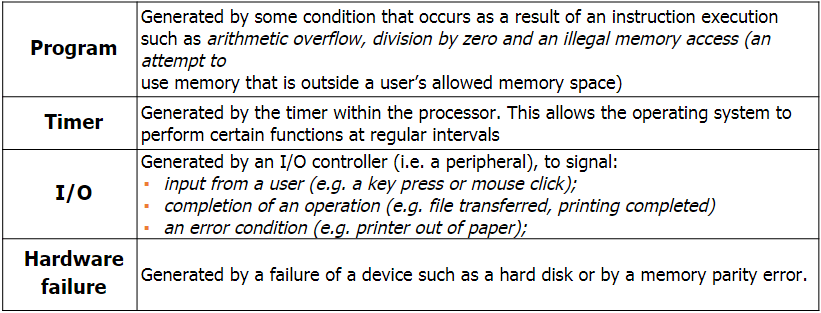
An interrupt is a signal from a device or program to request processing from the CPU. Process scheduling is handled by the OS and decides when a process is run and for how long.
It needs to respond to input devices and other system events, for example when the keyboard is pressed or the hard drive is ready to serve another request, the device sends an interrupt to the CPU telling them to process a keyboard press or hard drive is ready for more data.
When in interrupt is sent, the CPU receives it but the OS decides whether to perform it or ignore it.
When an interrupt occurs, the CPU on the next instruction cycle will then run a special OS code that inform it of an interrupt. It will then interrupt the currently running process and handle the request and move back onto the previous process.
It is important for the OS to handle these interrupts as it knows more about what the user is doing. When an interrupt occurs, the CPU informs the OS rather than dealing with it itself and the OS makes the decision weather or not to execute it.
Example:
- A user wishes to save a 30 MB file onto the hard drive. In order to do this, the file will need to be stored in small chunks of 1 MB.
- Using the buffer and interrupt system, the first chunk is sent to the hard drive, which, in turn, writes it to the disk.
- While this is occurring, the CPU will continue doing other tasks, such as dealing with keyboard interrupts or playing music.
- Once the hard drive has finished saving the file, it sends an interrupt to the CPU requesting more data, which is sent by the CPU.
- This cycle will continue until the file has been saved all 30MBs.
It is important to remember that the CPU is much faster than any other part of the computer, including the user. If the CPU waited for the hard drive to finish saving before it did anything else a lot of CPU cycles would be wasted. Interrupts allow the CPU to make much better use of time, increasing efficiency.
Priority of interrupts:
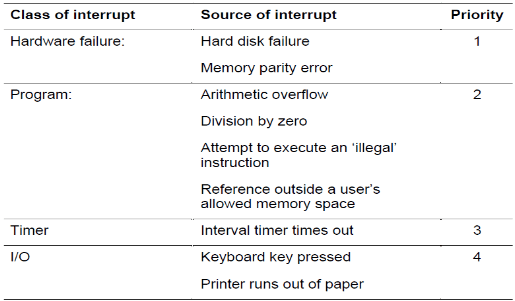
Some interrupts are more important than others so if 2 interrupts are requested at the same time then the system compares their priority and executes the higher priority first. Things like hard disk failure needs immediate attention whereas something such as the printer running out of paper can wait.
Interrupt Handling:
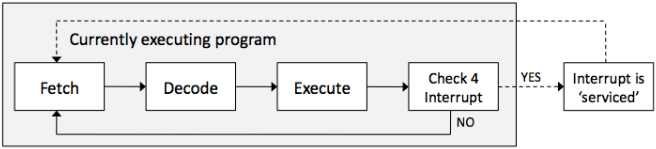
There is another step to the Fetch-Decode-Execute cycle. A check for an interrupt is done at the end. If there is an interrupt, then the address in the program counter will be temporarily be placed in a stack and then load the interrupt command and execute that then take the previous command back from the stack and then continue with the previous task.
Buffers:
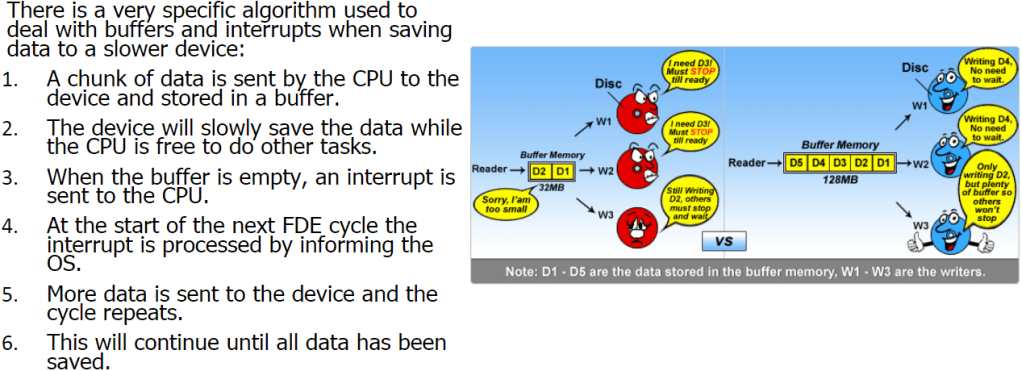
A buffer is a small block of memory within devices such as printers or keyboards where the work that that device is performing is stored. This is important because if you press more keys on your keyboard and the OS is not ready to serve the first key, then instead of losing the key strokes, it is stored in the buffer until the OS is ready to process it. Hard drives also contain a buffer. When a CPU sends data it is stored in the buffer before being written to the physical disk. This increases overall system performance as the CPU can work on other tasks.
When data is stored on or loaded from any device, buffers will be used.
Scheduling:
Scheduling is when the OS decides how and when a process is swapped in and out of the CPU, enabling multi-tasking. Each OS has a different way of handling scheduling, but these are hidden from the public.
A process is a piece of software that is currently being managed by the scheduler in the OS.
Scheduling must not be confused with interrupts. Interrupts are hardware signals sent to the CPU and handled by the OS whereas scheduling makes decisions on what should run next or which should be interrupted, known as pre-empting.
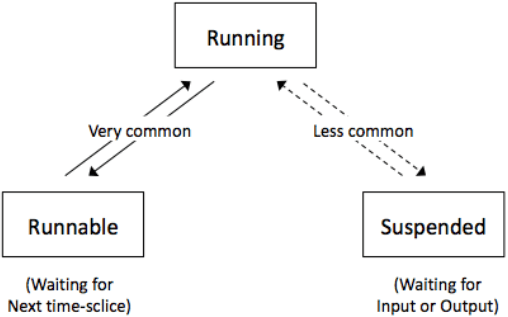
- Running: when the process has control of the CPU.
- Ready-to-run (Runnable): a process is in a queue waiting for the CPU.
- Blocked/Suspended: a process is waiting on an I/O operation such as the hard drive.
Only one process can be run on a single CPU core at a single time. This process will be in the ‘running state’ or just ‘running’. Other processes will be either in a ‘ready-to-run queue’, waiting for their turn with the CPU, or in a blocked state.
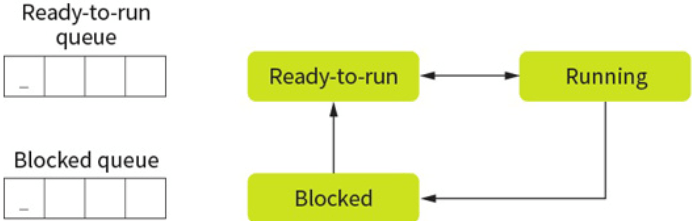
When a process is waiting for a device or external operation to complete, this process is blocked. A process is never in the ready to run queue when waiting for an I/O operation, but should place itself into a blocked state to give its place to something else.
Running Process:
- Complete the task (and close): This removes the process from scheduling completely and is the equivalent of the user clicking on quit. A process can elect to stop itself or it may have completed the processing.
- Be interrupted by the scheduler: Not to be confused with interrupts, which will stop a process so that the OS can deal with an event. This is where the scheduler has decided that the process has had enough CPU time and will swap it for another process. The currently running process is then placed in the ready-to-run queue based on the scheduling algorithm.
- Become blocked: In this situation, the process is moved to the blocked queue immediately. An interrupt could cause this to occur. Thus, preventing wasting CPU time.
- Give up CPU time: A process could voluntarily give up CPU access with the view of getting it back in the near future. A process which does this is known as a well-behaved process and tends to be given higher priority in most modern scheduling algorithms.
Scheduling Algortihm:
First Come First Serve (FCFS):
This is the simplest form of algorithm but is generally inefficient in terms of resource allocating.
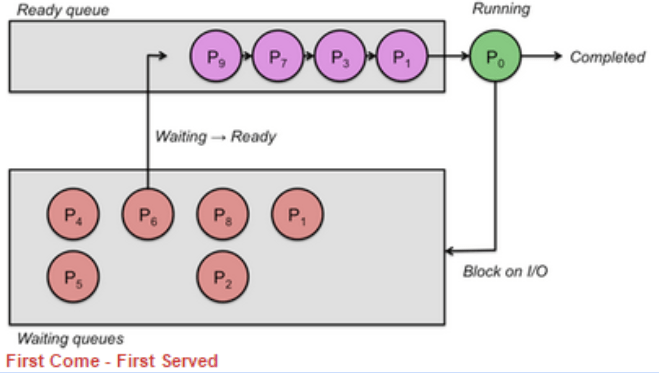
No matter how long the process takes to run, it always keeps the order of which was the first to arrive. This is why it is very inefficient.
Round Robin (RR):
This algorithm, each process is given a set time. When this time is up the CPU moves on to the next process, no matter if it is finished or not. This ensures fairness.
Shortest Job First (SJF):
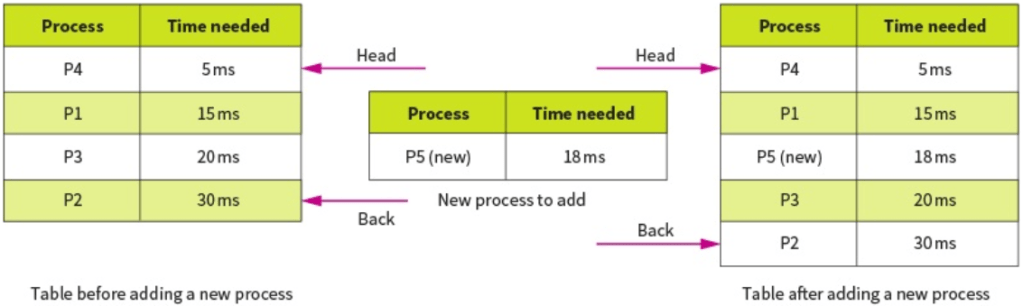
This is the most efficient in terms of average time taken. When a new task is submitted, it is placed into the queue based on how long it will take to complete. The shorter the time, the further up the queue it will be placed.
The OS predicts the time taken by each task by analyzing how long similar tasks took in the past.
This is similar to round robin except tasks are allowed to complete.
Shortest Remaining Time (SRT):
This is very similar to shortest job first but the time the tasks take is updated when they get a chance to process before being interrupted by a shorter task. This is different to SJF because the time remaining to complete the task is updated whereas in SJF it isn’t updated and the time it takes is based on the entire task, even when it has been partially processed. This allows the longer task to move up the queue as the time becomes shorter to avoid starvation.
Multi Level Feedback Queues (MFQ):
The above scheduling algorithms use single queue for scheduling, the ready to run queue.
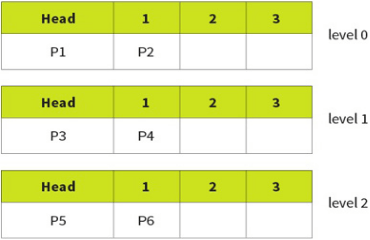
This algorithm uses 3 queues, 0, 1, 2 with 0 being highest priority. Each individual queue operates on a FCFS basis but tasks in queue 0 will always be run before tasks in 1 and 2.
However, this can easily lead to starvation so a promotion/demotion system is implemented:
- New processes always added to back of 0.
- If a process gives up the CPU on its own accord it is added back into the same queue.
- If a process is pre-empted (stopped by scheduler) it is demoted to a lower level.
- If a process blocks for I/O, it will be promoted 1 level.
 Computer Science Notes