A computer network is a group of computers that use a set of communication protocols for the purpose of sharing resources.
Network topologies:
Network topology refers to the physical arrangement of the components in a network. The network topology used will affect the cost, performance and ease of installation of a network.
Bus topology:
In a bus topology, all the devices are connected using a single main cable. The ends of the main cable are connected to a terminator which prevents the signal from being “reflected” back through the cable.

Advantages:
- Easy and inexpensive to install as it only requires one cable and not any additional hardware.
- Devices can easily be added.
Disadvantages:
- If the main cable fails, the whole network fails.
- Performance is greatly affected by traffic because there will be more data collisions.
- Poor security as all computers can see all the traffic on the network.
Star topology:
In a star topology, all the devices are connected to a central node called the hub which is often a network switch which acts as a router to send information to the intended device. All data sent across the network passes through the hub so there is no direct connection between devices.
![Network Topology: 6 Network Topologies Explained [Including Diagrams]](https://cdn.comparitech.com/wp-content/uploads/2018/11/star-Topology.jpg)
Advantages:
- Problems are easily isolated. When a cable fails, only one device is affected. Robust.
- Provides consistent performance as there are few data collisions.
- Good security as devices can’t intercept data from other devices.
- Easy installation as each device only needs one connection to the hub.
Disadvantages:
- If the hub fails, the whole network fails.
- May be costly due to length of cable required and cost of switch.
Physical vs Logical Topology:
The physical topology of a network is its actual physical design layout.
The logical topology is how devices appear connected to the user.
For example, a network could be in a star physical topology but if a device is connected with an ethernet cable, it may appear to the user that the devices are connected via a bus topology.
Local Area Network, LAN:
A single device not connected to other devices is called a standalone. As soon as you connect 2 or more devices together, they form a network. These networks fall into 2 categories, LAN and WAN.
Lan is when the devices in the network are geographically located closely to one another, E.G: in a school or business. This can be wired or wireless. Each device is called a Node.
The benefits of using a LAN are:
- Allows communication and data to be shared between staff.
- Easy and cheap to setup.
- Very quick.
LAN Hardware:
A variety of hardware is needed to connect nodes the the network and allow them to communicate efficiently.
Network Interface Card, NIC:
Each device (node) needs a NIC to connect to the LAN. This allows the device to provide a unique address so the device is identifiable.
Switch:
A switch is used to connect different components of the network together.
Router:
This device forward data packets between networks, usually from the internet to your LAN or vice versa. It reads the recipients IP address and forwards it to the correct place.
Wireless Access Point, WAP:
This device allows your devices to connect wirelessly to a wired network using protocols such as Wi-Fi or Bluetooth. To connect to the internet, the WAP is connected with a wire to the router. The router and WAP is usually built in together.
Wide Area Network, WAN:
A WAN is when you join 2 or more LANs that are geographically apart from each other via satellite or fibre-optic cable etc. The largest WAN is the internet.
Benefits of a WAN is it can cover near infinite geographical distance.
Downsides are expensive, speed, and ease of use.
The Internet:
The physical structure of the internet:
Each continent is connected by trans-continental lines fed across the sea bed called the backbone cables. Your Internet Service Provider, ISP, connects directly to this backbone cable and distributes this connection across the country to individuals.
Uniform Resource Locater, URL:
A URL is the address of a resource on the internet. It specifies the location of a resource on the internet, including its name and usually file type. The protocol and domain name together form the URL.

Domain Name System, DNS:
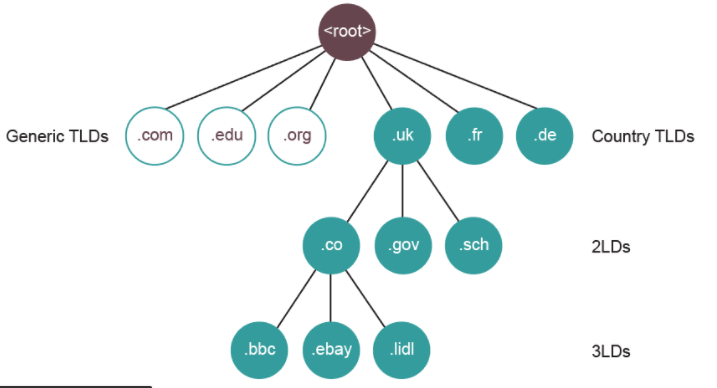
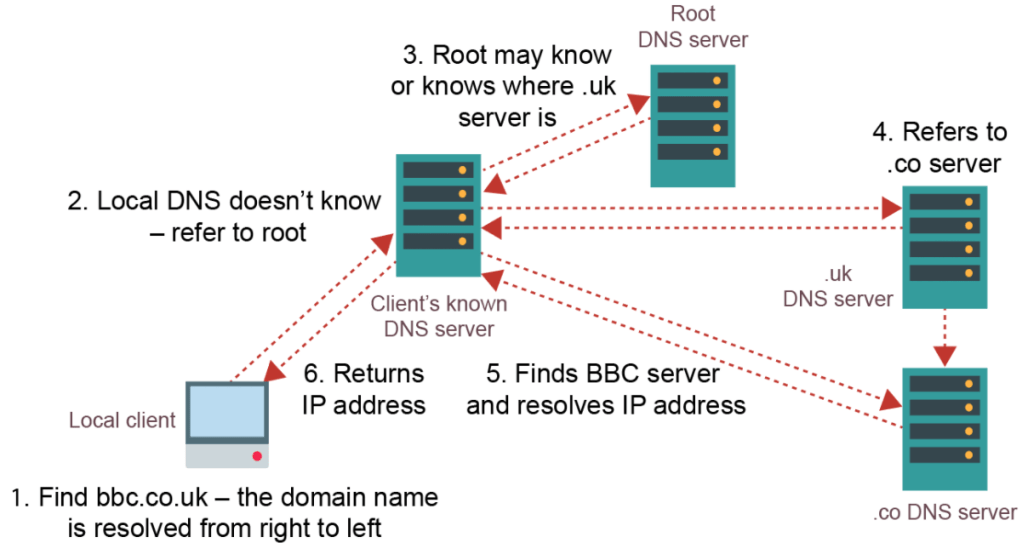
A domain name identifies the area or domain that an internet resource resides in. Each domain has a corresponding IP address. The DNS server stores a catalogue of all domain names and IP addresses. When a browser sends a request for a URL, it receives this URL and sends back the corresponding IP address which the browser will then use to connect to the resource. We use domain names instead of directly using IP addresses as they are easier to remember. For example:

The domain names are structured into a hierarchy of smaller domains.
IP Addressing:
Each node on a network has a unique IP Address. This works similar to a home address. It uniquely identifies each device on a network so data is sent to the correct destination.
IP Version 4 (IPv4) addresses are made up of 4 octet values (numerical values described by 8 bits) each separated by a full-stop. E.g: 14.132.250.10
There are about 4.3 billion IPv4 addresses, however these have now run out. A new version called IPv6 is now in use which provides up to 340 trillion trillion trillion addresses.
Internet Registries:
Internet Registries hold records of all existing domain names including currently available ones. These companies act as resellers for domain names and allow people to purchase them. They are also responsible for allocating IP addresses to domain names.
There are 5 global Internet Registries that are responsible for this.
Internet Communication:
Circuit Switching:
Circuit Switching is when a direct physical link between 2 devices is created for the duration of the communication, e.g a telephone box. This path stays connected even when there are period of silence. This does not work when there are millions of connections wanting to be connected at the same time. Also, because switches are used to connect and disconnect circuits, electrical interference is produced which lowers quality of speech or can corrupt/lose data. Because of this, packet switching was invented.
Packet Switching:
Unlike circuit switching, packet switching was developed so that communication channels can be shared so when one communication is temporarily not in use, another could use it.
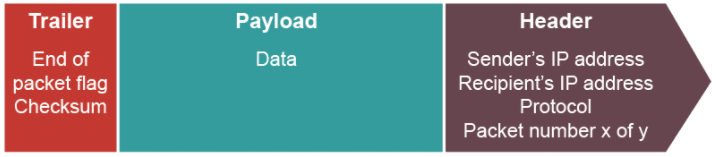
Both split data into data packets but circuit switching uses a continuous flow of data packets but in packet switching, data packets contain destination and assembly information as they get sent along different routes. The route taken by each packet is calculated by the routing algorithm which decides the optimum route for a packet to reach its destination. They then arrive at the destination in a different order and they are sorted again using the assembly information.
Data Packets:
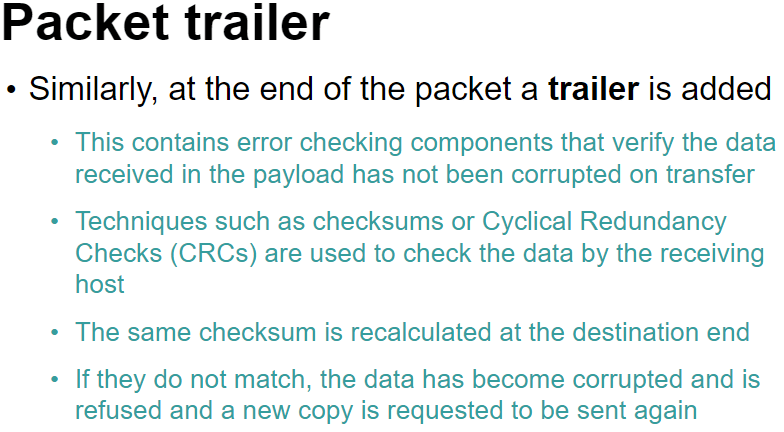
When sending data across a network, data is split into chucks called data packets which is then reassembled at the receiving end. The chunks need to be split into sensible sizes as too many small ones will create unnecessary excess data as header and trailer information is repeated many times and too large ones will hold up traffic behind it as it takes longer to send.
The latency is known as the time of travel of a data packet. E.g London to France may have a latency of 5ms.
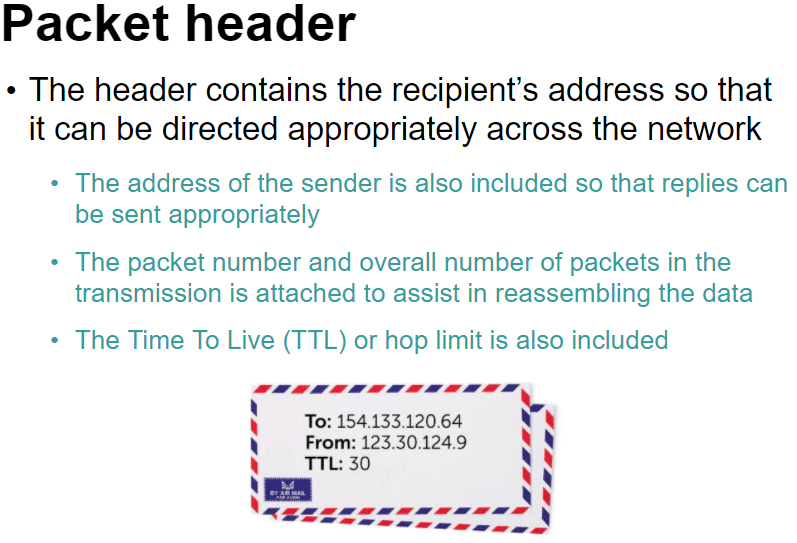
The TTL is the time at which point the data packet expires and is discarded.
Protocol – A set of rules to determine how data is transferred between devices in a network.
Gateways:
This is used when routing packets from one network to another and the 2 networks use a different set of protocols because a router can only be used when they share the same protocols.
The global standard of networking protocols is the TCP/IP stack.
TCP/IP Protocol Stack:
This is a set of rules used to format a message to be sent over a network.
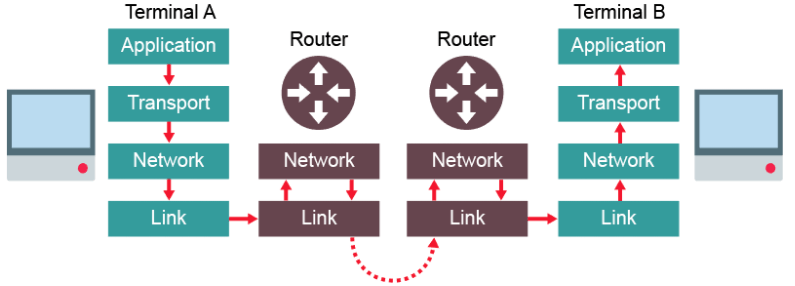
This protocol uses 4 connected layers. Each layer wraps the packets with its own data, like an envelope. When reaches the receiving end, it is unwrapped again.
- Application layer
- Transport layer
- Network layer (Or Internet layer)
- Link layer

Application Layer:
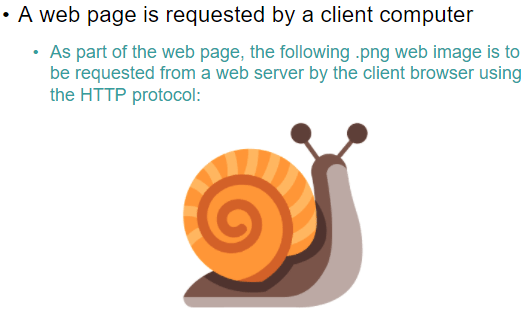
This layer is the highest abstraction level and provides the interfaces and protocols needed by the user. It provides services such as login, emails, file transfers and webpage display and chooses the suitable protocol based on which service is being requested by the user. For example, HTTP would be used to send the text data on a website.
Transport Layer:
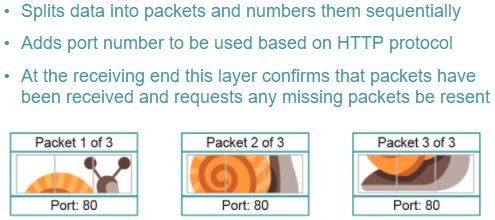
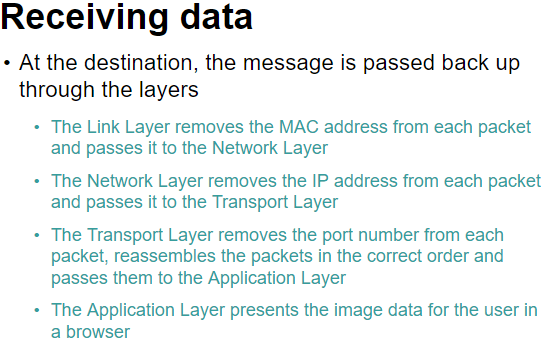
This layer uses the Transmission Control Protcol, TCP to establish an end-to-end connection with the recipient computer. The data is then split into packets and labelled with the packet number, total number of packets and the port number thorough which the packet should route. The port number ensures it is handled by the correct application on the recipient computer.
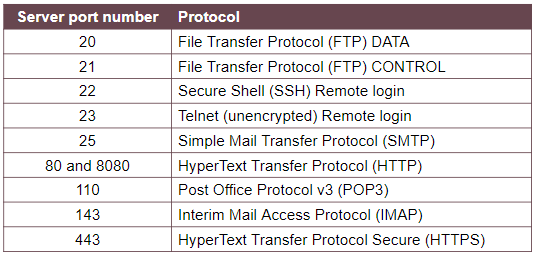
For example, port 80 is a common port used by the HTTP protocol which is usually the browser.
It also ensures all packets sent are received and can request retransmission if packets are missing.
Network Layer:
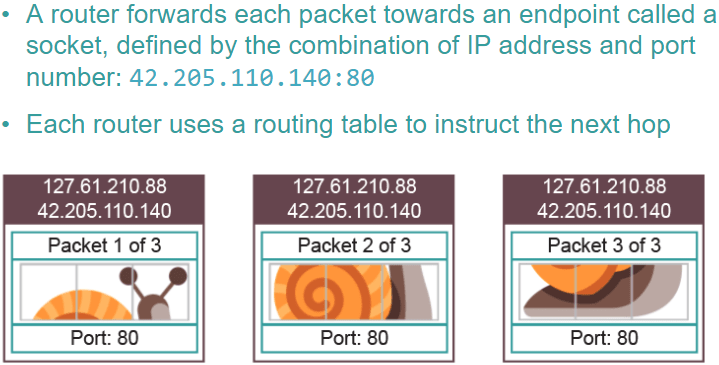
This layer adds the source and destination IP addresses. It adds the source address so it can return errors if needed. Routers inspect the IP address at this stage to calculate the optimum route to send the packet next.
Together the IP address and the port number form a socket. The socket specifies which device it must be sent to, through the IP address, and the application on that device, through the port number.
Link layer:
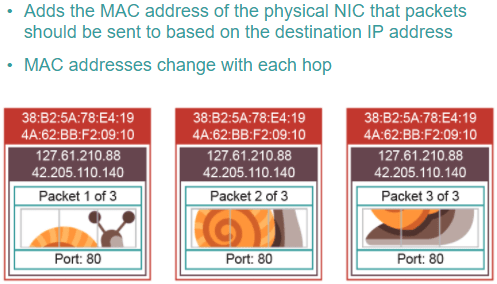
This layer is the physical connection between the nodes and adds the MAC address of the NIC of the source and destination computers. This is so that once the correct network is found using the IP address, it can then locate the correct piece of hardware using the MAC address. The destination MAC address is only the address of the destination router if it is being sent across networks. That’s why it needs the link layer when travelling between routers in the above diagram. If it is only within a network, the destination MAC address will be the destination device.
Media Access Control, MAC, addresses:
This uniquely identifies a physical device with its Network Interface Card, NIC. This may be the destination computer or the next router in transit.
Packets move up and down the Network and Link layer of the stack as they hop across routers, changing the source and destination MAC addresses as they go.
Port Numbers:
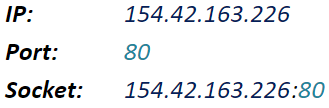
This identifies the application requires to deal with the data sent to the computer.
Together with the IP address they form a socket. E.G:
Common Ports:
Transferring files with FTP:
FTP is an application level protocol used to move files across a network. Often, usernames and passwords are used to protect the files for security purposes.
Sending and Receiving Email:
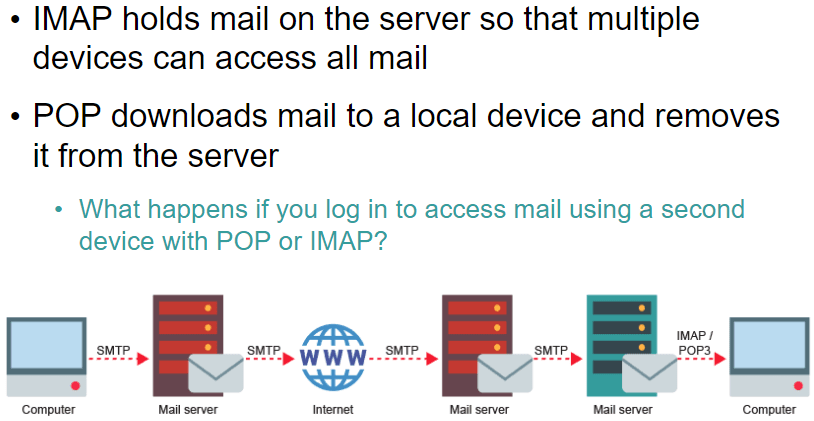
A mail server acts as a virtual post office for incoming and outgoing emails. They are dedicated computers that are responsible for storing emails, providing access to clients and providing services to send emails.
They use 3 protocols:
- SMTP – Used to send emails and forward them between mail servers.
- POP3 – Downloads email from the mail server to the local computer, deleting it from the server.
- IMAP – Manages emails on a server so multiple clients can access the same email simultaneously.
 Computer Science Notes