1.1.3: Virtual Storage

Virtual storage is when you combine multiple drives into one to increase performance and storage. This is mainly used in enterprise level when a single drive is not sufficient enough for multiple people accessing one file at a time. However, building a network-attached storage device (NAS) is very expensive so bringing multiple devices together and treat it as one drive is better. This is known as virtual storage.

Data Striping – When data such as a file is split into blocks and stored across multiple drives.

Redundant Array of Independent Disks (RAID):

This is one of the most common types of virtual storage. It can be used with both SSDs and HDDs to bring multiple drives together as one. NAS’s will commonly support multiple drives in RAID form. Multiple hard drives can be brought together to improve performance and reliability. This is known as RAID.

http://www.linux-mag.com/s/i/articles/7924/325px-RAID_0.svg.png

RAID Models:

RAID 0 – Striped: This provides improved performance and additional storage by taking data and seperating it into blocks and spreading them across multiple drives.. However, it does not take well to errors so any errors would destroy the data stored.

https://upload.wikimedia.org/wikipedia/commons/thumb/b/b7/RAID_1.svg/220px-RAID_1.svg.png

RAID 1 – Mirrored: Each drive has the same information written to it so it provides some tolerance. Because data is repeated, storage available is halved and write speed is decreased. But read speed is increased.

https://upload.wikimedia.org/wikipedia/commons/thumb/6/64/RAID_5.svg/300px-RAID_5.svg.png

RAID 5 – Striped Parity: This requires multiple discs in the array and provides fault tolerance and parity checks and error corrections. The parity information is stored on a single drive, so the other drives can continue working if one drive fails. The data lost can be calculated using the parity data stored on the parity drive.

Storage Area Network (SAN):

Although RAID offers good storage solutions for most small networks, storage area networks offer more features and much greater scalability. Basically, a SAN acts as a gateway to a series of block devices, such as RAIDs, and brings them together.

A SAN network can be seen as a small section of a network that is only responsible for serving files.

A key difference between RAID/NAS and SAN is that NAS is a single device connected to the local area netwrok (LAN) whereas NAS is a server that connects multiple storage devices together to improve performance and latency.

NAS stores data in file level, which means it is accessed in bulk, decreasing performance. In a SAN, data is stored in block-level meaning each sets of data is stored as one block with a given identifier and the system doesn’t have to look through every bit of data to find the desired file it just looks for a specific identifier.
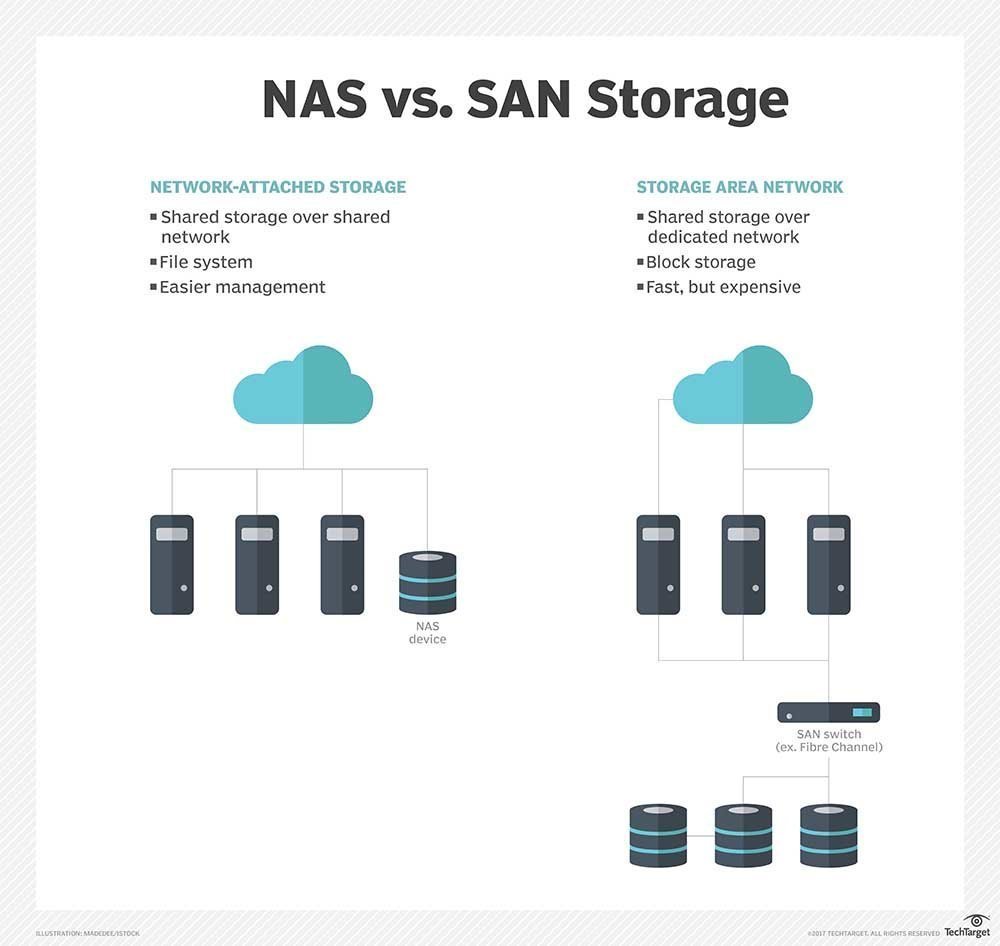
Image result for SAN

Cloud Storage:

Cloud storage is a service in which data is stored and maintained by a cloud storage service provider. It is accessed through the internet. Generally, users pay for the storage that they take up, on a subscription basis.

1.1.3: Magnetic, Flash, and Optical Storage

Magnetic Storage:

This is a hard drive that uses physical disks to store data on. It is very common on computers and data centers. They are high-capacity and relatively cheap, but are lower in performance compared to the more modern solid state drives. It is a good storage option for a good compromise between capacity, speed, and cost.

http://thewindowsclub.thewindowsclubco.netdna-cdn.com/wp-content/uploads/2012/10/diagram-of-hard-disk.png

The hard drive works by having a platter that is spun around at thousands of rpm by the center spindle. An arm with a special head is placed over the surface of the platter as it spins and can move back and forth to reach all areas of it. To read and write data the small magnetic head is pointed at the disc. The section then becomes magnatized, representing a 1 or left demagnatized, representing a 0. There is usually 2 arms per disc, one for the top and one for the bottom.

Sections on the platter are arranged in very neat patterns. Bits of data are arranged in circular paths called tracks and each track is then broken up into sectors. A part of the hard drive remembers which sectors are free and which are storing data. When the computer stores new information, it looks at the map and instructs the read-write head to move across the platter to the exact location and store the data there. To read information this process runs in reverse.

Flash Storage:

Image result for flash storage

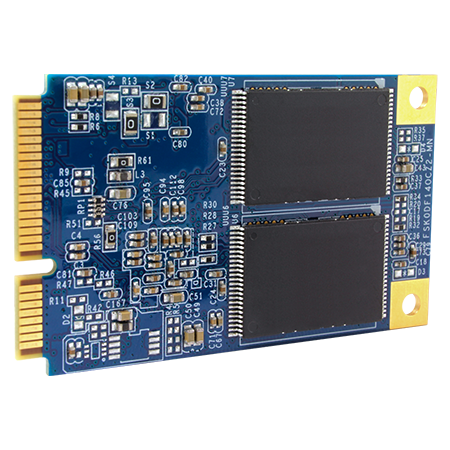
These Solid State flash storage devices are becoming increasingly popular. They use flash memory to store data instead of physical spinning disks. This means they have much higher performance compared to a hard drive at the cost of price and capacity. This flash memory is similar to that in RAM but can save their data once the power source is disconnected. This is because they use a special transistor with a second gate which lets the transistor hold the electrical charge even when there is no power source so they can save their on or off state after a reboot. Refer to RAM and ROM to see how it works.

Optical Storage:

http://www.trademan.net/portals/0/TM_IMAGES/Pits-Lands2.png

These are more commonly known as DVD’s. They work by using a laser to burn microscopic “pits” into the reflective surface of the disc. This creates Pits and Lands on the surface, representing binary 1 and 0. To read this, the optical drive reader points a laser at the surface and lets the motor spin the disc round. It then reads the binary because the lands reflect the laser straight back at the sensor and the pits scatter the laser around. This is how data is read from a dvd.

1.1.3: RAM & ROM

RAM – Random Access Memory.

RAM is a type of primary storage and is the main place for storing instructions while a program is being run. Data must be copied to the primary storage (RAM) from the secondary storage (Hard drive) before being executed by the CPU. For example, your OS and any programs open are stored in the RAM. However, it is volatile so once it loses power, such as when you turn your computer off, it gets wiped. To store data permanently, it needs to be written to a storage drive. RAM is much faster than a hard drive which is why data is loaded to it before being executed.

How it works:

Each block or address inside memory is numbered starting from 0 and going up in fixed values. For example, a 1 GB memory chip contains approx 270,000,000 addresses. To access the data you need to know the address of where it is stored.

A capacitor and a transistor work together to make a memory cell which represents a single bit of data. The capacitor stores the binary data (1 or 0) and the transistor acts as a switch which lets the system read the capacitor or change its state.

A capacitor is like a bucket that stores electrons. To store a 1, it is filled with electrons. To store a 0 it is emptied. However, these buckets are constantly being leaked. In a matter of a few milliseconds a bucket is emptied. Therefore, for dynamic memory (DRAM) to work, the CPU or memory controller recharges all the capacitors holding a 1 thousands of times per second to stop them from all emptying.

ROM – Read Only Memory

ROM stores essential software that enables the system to run. It stores information that enables the computer to start up. It does not store the OS. It instructs the CPU how to start up the hardware. ROM is non-volatile so it is not wiped when the computer is turned off.

1.1.3: TouchScreens

There are 3 types of touchscreens: Resistive, Capacitive, and Infrared

Resistive:

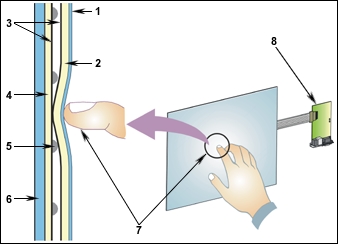
This is where there are 2 conductive layers with current going through them underneath the screen, seperated by tiny dots. When you press down on it the 2 layers touch and the electrical current changes at that point. The software then recognizes this change and reacts accordingly.

This is not the best type as you can only touch one point at a time and the screen does not look the best due to multiple layers.

Capacitive:

Unlike resistive, capacitive doesn’t use pressure to detect your finger, but instead works with anything that holds an electrical charge, including our skin. It is made from materials such as copper or tin that hold an electrical charge that is made into an electrostatic grid of tiny wires, each smaller than a hair.

There are 2 types of capacitive touch screens, surface and projective. Surface uses sensors at each corner and a thin film across the screen whereas projective uses a grid with a seperate chip for sensing.

In both Capacitive screens when a finger touches the screen a tiny electrical charge is transfered to the finger which creates a voltage drop at that point of the screen. The software recognises this voltage drop as a touch an acts accordingly.

Image result for capacitive touch screen

Infrared:

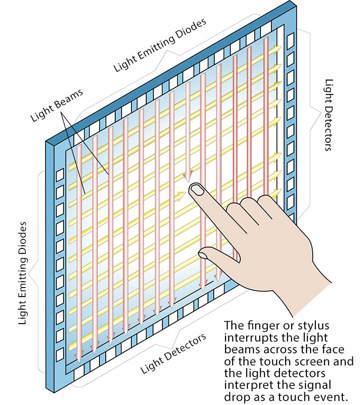
Infrared touch uses LED’s and sensors embedded around the edge of the display. This creates an invisible grid of infrared beams that have photo detectors on the other end of the beam. When you touch the screen, you break some of the lines. These breaks are detected by the sensors because there is no light being beamed onto it. This is used to determine the location of your finger and the software acts accordingly.

1.1.3: Sensors and Actuators

Sensors: A device that detects a physical change in its environment and sends information to another electronic device.

Actuator: A device that causes another machine operate. Basically the ‘mover’.

Image result for actuator
Factor being measuredSensorActuator
LightLDR, Photodiode, Photo-transistor, Solar CellLight, Display, Fibre-Optics
TemperatureThermostat, ThermistorHeater, Fan
Force/PressurePressure Switch, Strain GaugeLifts, Electromagnet
PositionPotentiometer, Encoder, LVDTMotor, Solenoid, Panel Meter
SpeedTacho-Generator, Doppler effect sensorAC and DC Motor, Stepper Motor, Brakes
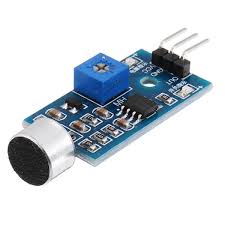
SoundCarbon Microphone, Piezo-electric CrystalBell, Buzzer, Loudspeaker

2.1 Computational Thinking

Computational thinking is to think logically.

2.1.1 Abstraction:

Levels of abstraction:

The more abstract something is the less detail is shown, vice versa.

Data always starts as reality before being abstracted.

There are 3 levels of abstraction: Physical level, Logical level, and View level. Physical being the lowest.

Reality -> Physical -> Logical -> View

Physical Level: Lowest level of abstraction. This describes how a system stores the data. This describes complex data structures in great detail.

Logical level: This level describes what data is stored and their relationships. This level describes the entire database in terms of a number of smaller structures. This may involve very complex physical level structures but users of logical level don’t need to under stand them.

View Level: This level only describes part of the entire database. People only access part of the database that they need. This simplifies the data only down to the parts that are needed.

2.1.2 Thinking Ahead:

Input: Data that is entered into a system.

Output: The result of the input once it has been processed.

When programming a system we need to consider:

  • Outputs required.
  • Inputs and processes required to create desired output.
  • Consider resources needed.
  • Consider user expectations.

2.1.3 Thinking Procedurally:

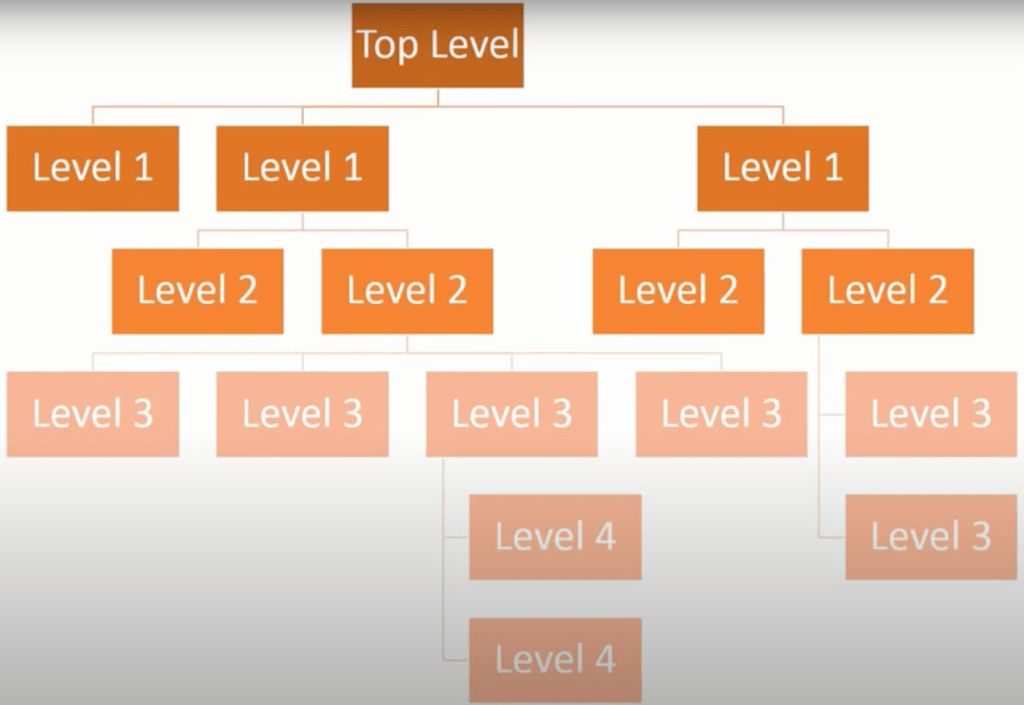
All about working out the sub-parts of a large problem so it can be tackled in more manageable chunks. We need to identify the components of the problem. A common approach for this is breaking down the problem into a top-down modular design using a method called step-wise refinement.

Each box represents a part of the problem you will have to design to make up the solution.

Advantages of a top-down modular design:

  • Splits the problem into many small modules so it is easily managed.
  • Error checking is easier because you can check each module one by one.
  • Easier to work on with multiple people.
  • Reusability of the modules.

2.1.4 Thinking Logically:

A good algorithm:

  • has clear and precisely stated steps that produce the correct output for any set of valid inputs.
  • should allow for invalid inputs.
  • must always terminate at some point.
  • should execute efficiently, in as few steps as possible.
  • should be designed in such a way that other people will be able to understand it and modify it if necessary.

Tools for designing algorithms include pseudo code and flowcharts.

Almost all algorithms have decision points which include things like if statements

E.g Trace tables

2.1.5 Thinking Concurrently:

Concurrent thinking is the process of completing more than one task at any given time. However, this doesn’t mean you are working on multiple tasks at once.

Concurrent processing is when tasks are gives slices of processor time to give the illusion that tasks are being performed simultaneously and concurrent thinking is similar to this. When tasks are being performed at the same time is parallel processing.

Concurrent processing is usually performed by a single processor and parallel processing is usually used with multiple processors/cores.

For example, you are given 2 tasks, record the number plate and the colour of the cars that pass you in a given time.

To tackle this problem, an efficient way to do it is to record the number plate and colour of one car then move on to the next car.

Advantages of concurrent processing:

  • The number of tasks completed in a given time is increased.
  • Less time is wasted waiting for an input as other tasks can be completed in the meantime.

Disadvantages:

  • Not all tasks are suited to being broken up and performed concurrently.

1.1.3 – Input, Output and Storage

Input – Something that is given to a device to begin a process.

Output – Information that is processed and sent out by a device.

Storage – Something that retains information.

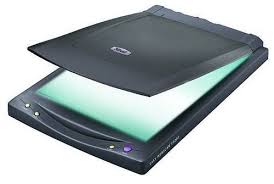
Scanners: They take printed media to generate a digital bitmap of an image. Common use is to digitize photos or to perform character recognition. When an image is digitized, it is converted into a series of pixels which is stored as binary data based on the colour of the pixel.

Optical Character Recognition(OCR): The identification of printed characters using photoelectric devices and computer software.

Image result for optical character reader

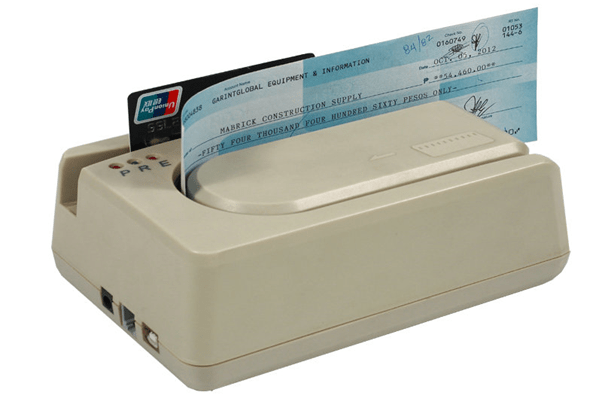
Magnetic Ink Character Recognition(MICR): It is a technology used to check the legitimacy of paper documents, especially checks. Unique ink, which is sensitive to magnets is used to print certain characters on genuine documents. Mainly used in banks.

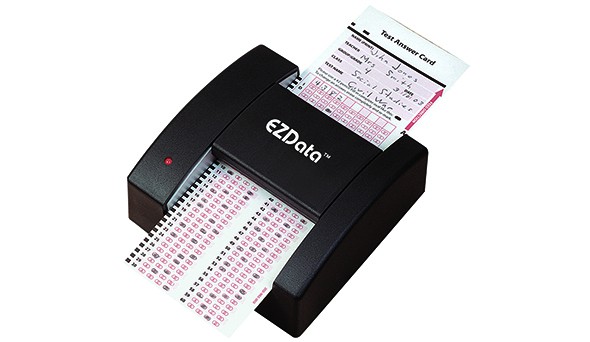
Optical Mark Recognition(OMR): This is used to see human-marked, such as a dash, on a form. Main uses of this is to read questionnaires and multi-choice exam papers.

Image result for OMR

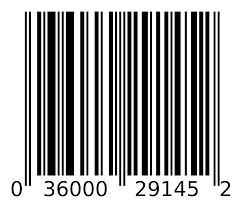
Barcodes: Method used to show data in a visual, machine-readable form. They are varied by the different widths and thicknesses of the lines. They are used in the retail market to identify different products.

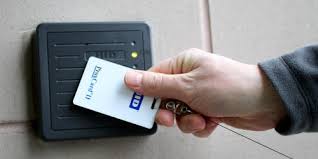
Radio-Frequency Identification(RFID): It involves the use of electromagnetic fields to automatically track tags that have been placed on objects. The tags contain electronically stored information that is captured by a reader.

Mastermind Number Generator Game

I have created a code using Python for a game that will generate a random 4 digit number and make you guess it.

from random import randint

N1 = randint(1,9)
N2 = randint(1,9)
N3 = randint(1,9)
N4 = randint(1,9)


print('Guess the four digit number (one digit at a time)')

answer = N1,N2,N3,N4
tries = 1
while True:
    g1 = int(input())
    g2 = int(input())
    g3 = int(input())
    g4 = int(input())
    numbersr = 0
    numbersw = 0

    if (g1 == N1):
        numbersr += 1
    else: numbersw += 1

    if (g2 == N2):
        numbersr += 1
    else: numbersw += 1

    if (g3 == N3):
        numbersr += 1
    else: numbersw += 1

    if (g4 == N4):
        numbersr += 1
    else: numbersw += 1

    if (numbersr == 4):
        print('Congratulations, it took you ' + str(tries) + ' tries')
        break
    else:
        print('You got ' + str(numbersr) + ' right')
        tries += 1

After a wrong guess it will tell you how many you guessed right and at the end it will tell you how many tries it took you to get it.

My thoughts on Artificial Intelligence

I believe artificial intelligence technology is an ever-growing part of our lives and will be essential in the future as technology becomes more complex. Currently, it aids us in a wide range of things from manufacturing to security and travel. However, the potential for artificial intelligence technology in the future is limitless. With autonomous cars on the horizon governments and large cooperation’s across the world invest billions into this growing industry of research and development as they see the importance and potential of this technology.

Currently, one large advantage of AI technology is overcoming human limitations to research and develop our understanding of things such as the ocean floor and space exploration. Because they are machines, we can modify and use certain materials to build them to withstand extreme conditions to explore places humans are unable to. In the future, this could help human understanding of many dangerous mysteries such as black holes. Also, dangerous jobs such mining can be automated by robots, preserving human life and also increase efficiency of resource gathering to supply the ever-growing demand as development happens elsewhere. However, AI are not only advantageous physically but, in some cases, also mentally as they do not have emotions to cloud judgement. This is useful in tasks that require difficult decisions as they can provide a logical answer which is not affected by emotions. However, this isn’t totally positive as the popular situation of the autonomous vehicle veering towards a dog or a child has heavy arguments against AI technology. Because of the lack of emotion and morality, AI are unable to give moral responses which deem it unable to perform certain tasks ‘correctly’.

Also, the use artificial intelligence for automation greatly increases the efficiency of repetitive tasks by reducing the chance of error and increasing consistency compared to human labour and providing a 24/7 ongoing process without breaks or being distracted. This has greater output compared to human labour but to the cost of job losses for people. Furthermore, AI technology is not only useful for work, but for entertainment also. For example, AI in computer games have come a long way in recent years and have been programmed to act and play like a human.

However, like everything artificial technology has its down sides. One major disadvantage is cost. The creation of complex AI requires huge costs as it takes a lot of time and hard work to create. And once created, large maintenance and repair costs are presented as software requires constant updating as AI cannot change itself, humans have to program updated code into them. Also, in the case of a breakdown, large chunks of code can be lost which wastes a lot of time and money.

Also, a very undesirable result may worry much of the labour force in jobs that are repetitive such as manufacturing, which is the replacement of humans for robots. The use of robots can cause large scale unemployment which will cause thousands of jobs to be lost. Because machines don’t need a salary, can have non-stop production, and are very quick, many company CEO’s choose to replace part of their workforce with machinery as they get greater output with lower running costs. This makes AI a very tempting path for many employers to use.

Also, many people are speculating about the future of AI that they will become too smart and too developed, leading to artificial intelligence potentially taking over the human race. However, in today’s world AI are already a large threat to the online world. In the wrong hands, AI can be used to launch cyber-attacks on any online network, risking the leak of private and confidential information. For example, in 2013-2014 Yahoo was the victim of a major cyber-attack, leaking private information of over 3 billion of its users. Also, not only is it just large organisations that are at risk but us in our everyday lives. Over the years we have become so dependent on AI powered things such as our phones, computers and cars that without them we would be unable to do simple tasks that technology does for us.

Overall if used in the right ways for the right purposes, artificial intelligence can greatly benefit mankind and accelerate development rates of technologies across the world to help eradicate problems in the world such as poverty or crime.  I believe that in the future AI will become a core part of human life and will be essential for our survival, for example the future of space exploration heavily relies on AI to explore and give information on new places instead of risking human life.

Design a site like this with WordPress.com
Get started