Big O Notation
Big O Notation is essentially a measure of the performance/complexity of an algorithm, also known as the time complexity of an alogrithm.
There are 5 main notations: Constant, Linear, polynomial, Exponential and Logarithmic.
Constant has a time complexity of O(1). This means it has a constant execute time no matter the size of the input as the input does not affect the number of lines of code executed. These do not contain loops, recursions or calls to any other non-constant time function.
Linear has a time complexity of O(n). This means its execute time grows directly proportional to the size of the input, n.
Polynomial has a time complexity of O(n^x). This is similar to Linear but the execute time rises much steeper with increasing input size. Polynomial algorithms contain nested loops which increases x per nested loop.
Exponential has a time complexity of O(2^n). This is similar to polynomial but the execute time rises even more steeply with input size. Per input unit, the execute time doubles so these algorithms take a long time to run. This type of algorithm is often seen in brute force algorithms.
Logarithmic has a time complexity of O(log n). This is like the opposite of polynomial. The execute time decreases in steepness with increasing input size. This is often seen in divide and conquer algorithms.
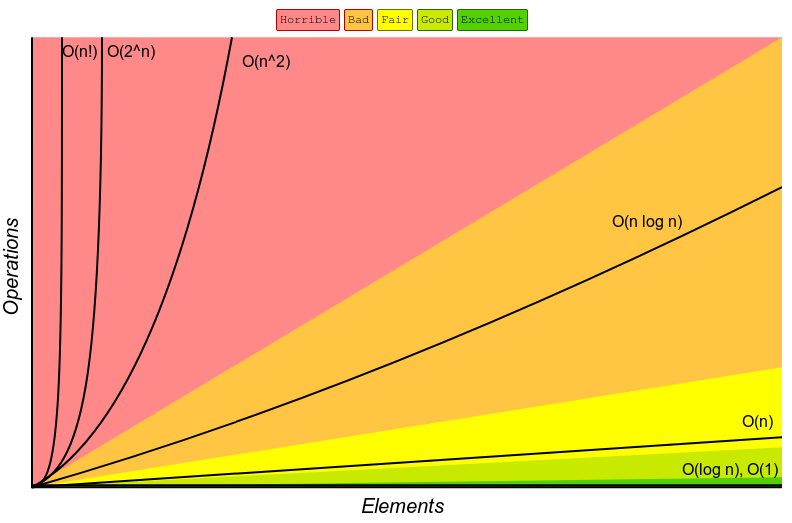
Polynomial and exponential algorithms should be avoided if input size n is large as it will have a very inefficient and slow execute time. A logarithmic algorithm should instead be considered as its execute time scales very well with larger input sizes.
To calculate a big O of an algorithm you take the most significant term and remove the constants.
E.g: 3n^2 + 5n + 2. Has big O notation of n^2.
Karnaugh Map
Boolean expressions describe electric circuits in computer systems and selection statements in programming. We use logic gates to picture these electric circuits.
It is important to use as few expressions (gates/electric components) as possible to:
- Reduce size of circuit.
- Reduce manufacture cost.
- Reduce power consumption.
- Execute instructions as quickly as possible by reducing need to fetch variables from memory.
We can use Karnaugh maps to model expressions. This is one method that can be used to find simplifications within Boolean expressions.
Simplifying Boolean Expressions
General Rules for AND and OR:
AND: Both terms have to be 1, or TRUE, for the result to be 1, or TRUE.
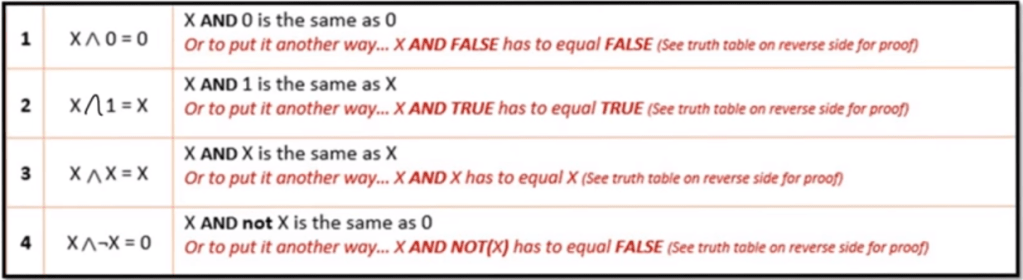
OR: Only 1 term has to be 1, or TRUE, for the result to be 1, or TRUE.
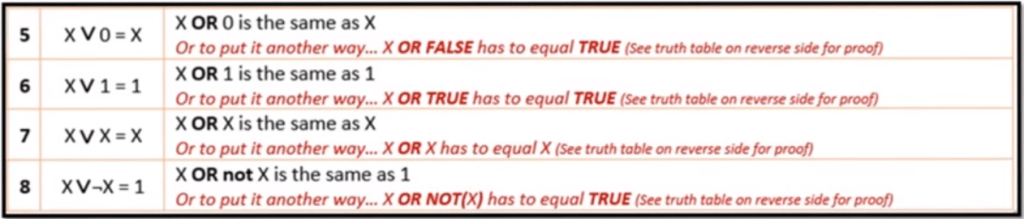
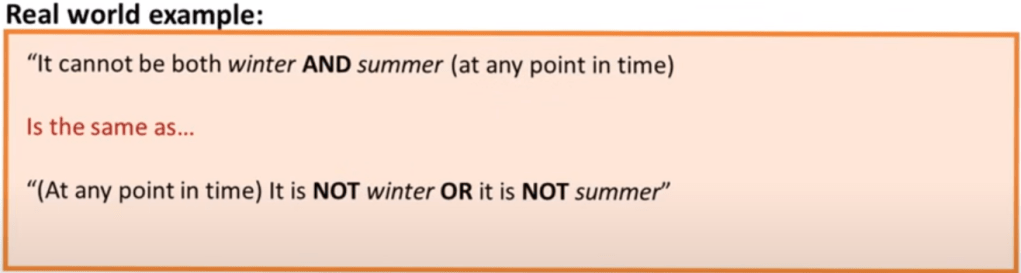
Rule 1: De Morgan’s Law
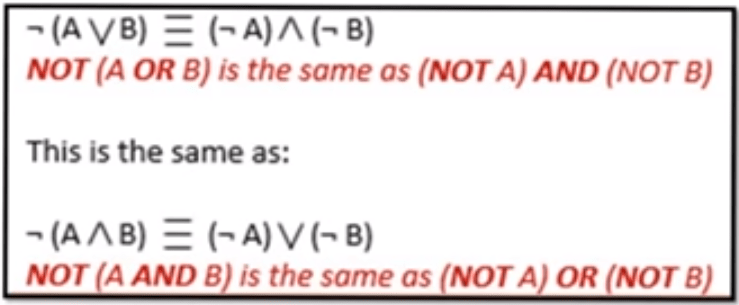
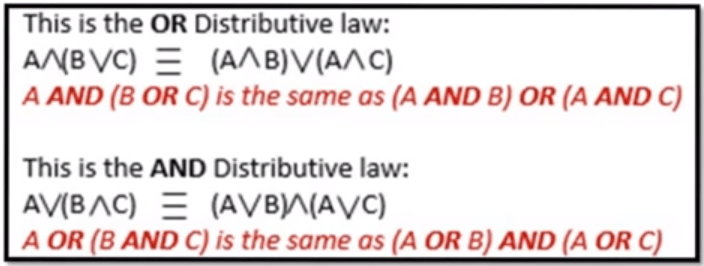
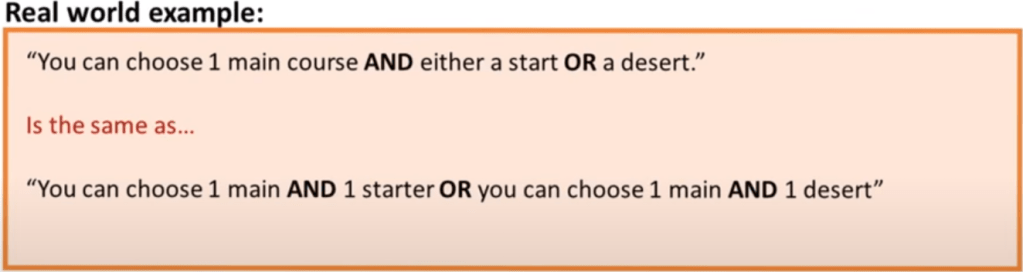
Rule 2: Distribution
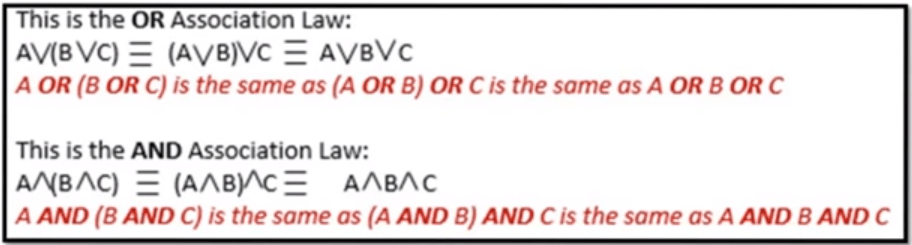
Rule 3: Association
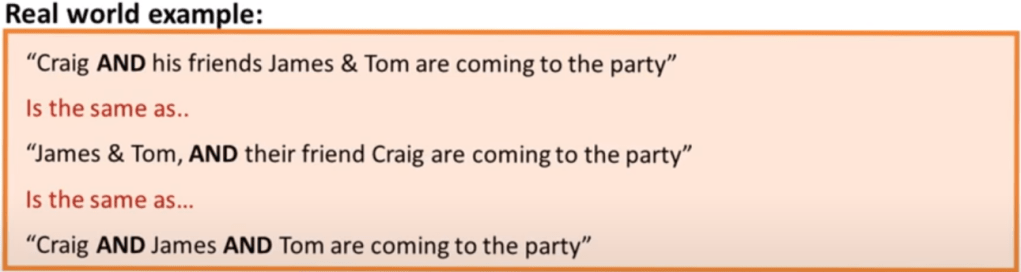
Rule 4: Commutation
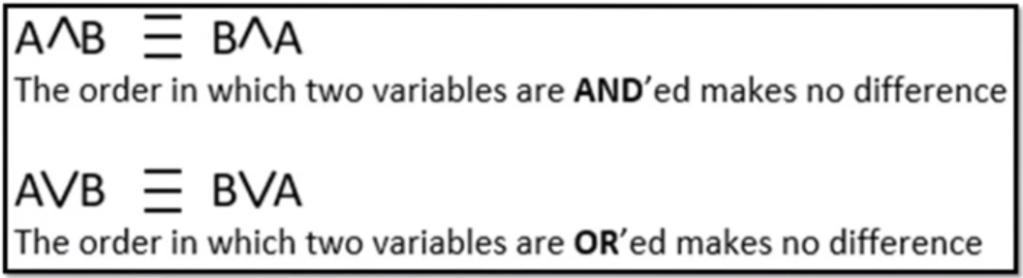
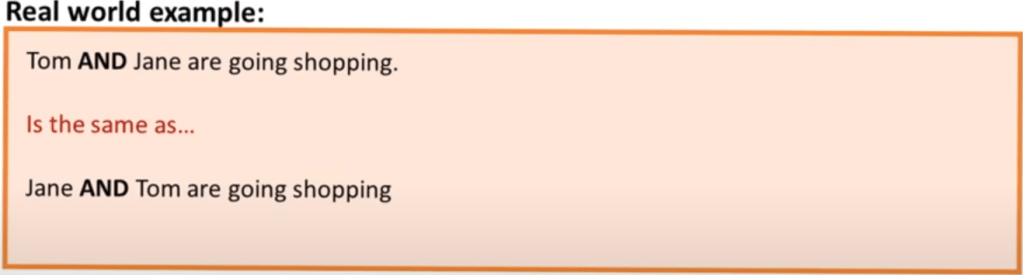
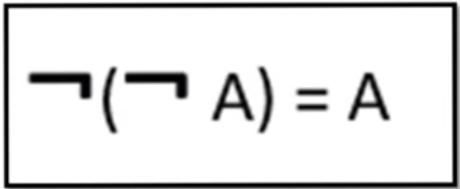
Rule 5: Double Negation
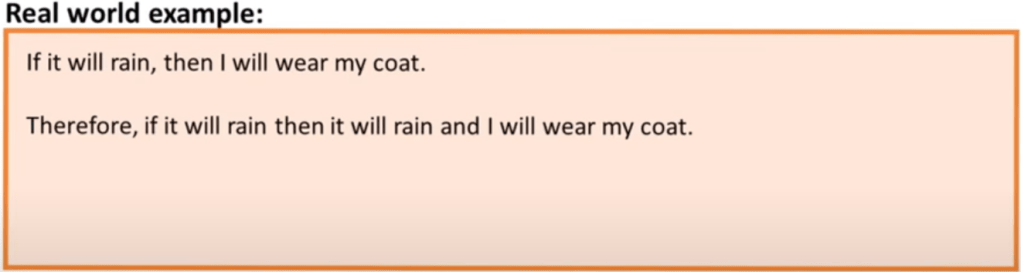
Rule 6: Absorption
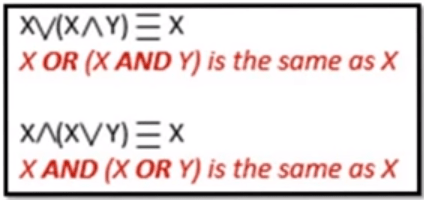
2 Conditions need to be met to apply the absorption rule:
- Operators inside and outside the brackets must be different.
- Term outside the bracket must also be inside the brackets.
1.3.3 Networks
A computer network is a group of computers that use a set of communication protocols for the purpose of sharing resources.
Network topologies:
Network topology refers to the physical arrangement of the components in a network. The network topology used will affect the cost, performance and ease of installation of a network.
Bus topology:
In a bus topology, all the devices are connected using a single main cable. The ends of the main cable are connected to a terminator which prevents the signal from being “reflected” back through the cable.

Advantages:
- Easy and inexpensive to install as it only requires one cable and not any additional hardware.
- Devices can easily be added.
Disadvantages:
- If the main cable fails, the whole network fails.
- Performance is greatly affected by traffic because there will be more data collisions.
- Poor security as all computers can see all the traffic on the network.
Star topology:
In a star topology, all the devices are connected to a central node called the hub which is often a network switch which acts as a router to send information to the intended device. All data sent across the network passes through the hub so there is no direct connection between devices.
![Network Topology: 6 Network Topologies Explained [Including Diagrams]](https://cdn.comparitech.com/wp-content/uploads/2018/11/star-Topology.jpg)
Advantages:
- Problems are easily isolated. When a cable fails, only one device is affected. Robust.
- Provides consistent performance as there are few data collisions.
- Good security as devices can’t intercept data from other devices.
- Easy installation as each device only needs one connection to the hub.
Disadvantages:
- If the hub fails, the whole network fails.
- May be costly due to length of cable required and cost of switch.
Physical vs Logical Topology:
The physical topology of a network is its actual physical design layout.
The logical topology is how devices appear connected to the user.
For example, a network could be in a star physical topology but if a device is connected with an ethernet cable, it may appear to the user that the devices are connected via a bus topology.
Local Area Network, LAN:
A single device not connected to other devices is called a standalone. As soon as you connect 2 or more devices together, they form a network. These networks fall into 2 categories, LAN and WAN.
Lan is when the devices in the network are geographically located closely to one another, E.G: in a school or business. This can be wired or wireless. Each device is called a Node.
The benefits of using a LAN are:
- Allows communication and data to be shared between staff.
- Easy and cheap to setup.
- Very quick.
LAN Hardware:
A variety of hardware is needed to connect nodes the the network and allow them to communicate efficiently.
Network Interface Card, NIC:
Each device (node) needs a NIC to connect to the LAN. This allows the device to provide a unique address so the device is identifiable.
Switch:
A switch is used to connect different components of the network together.
Router:
This device forward data packets between networks, usually from the internet to your LAN or vice versa. It reads the recipients IP address and forwards it to the correct place.
Wireless Access Point, WAP:
This device allows your devices to connect wirelessly to a wired network using protocols such as Wi-Fi or Bluetooth. To connect to the internet, the WAP is connected with a wire to the router. The router and WAP is usually built in together.
Wide Area Network, WAN:
A WAN is when you join 2 or more LANs that are geographically apart from each other via satellite or fibre-optic cable etc. The largest WAN is the internet.
Benefits of a WAN is it can cover near infinite geographical distance.
Downsides are expensive, speed, and ease of use.
The Internet:
The physical structure of the internet:
Each continent is connected by trans-continental lines fed across the sea bed called the backbone cables. Your Internet Service Provider, ISP, connects directly to this backbone cable and distributes this connection across the country to individuals.
Uniform Resource Locater, URL:
A URL is the address of a resource on the internet. It specifies the location of a resource on the internet, including its name and usually file type. The protocol and domain name together form the URL.

Domain Name System, DNS:
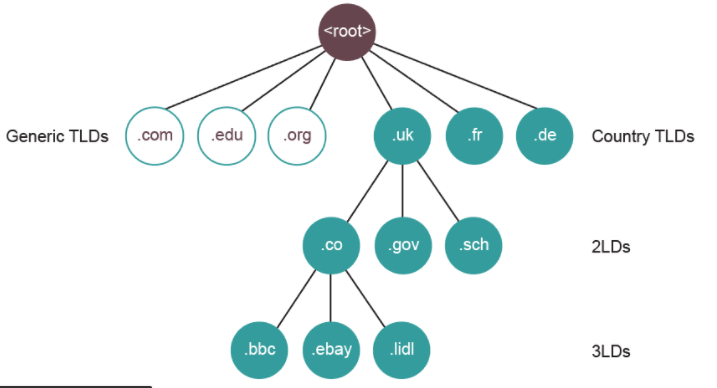
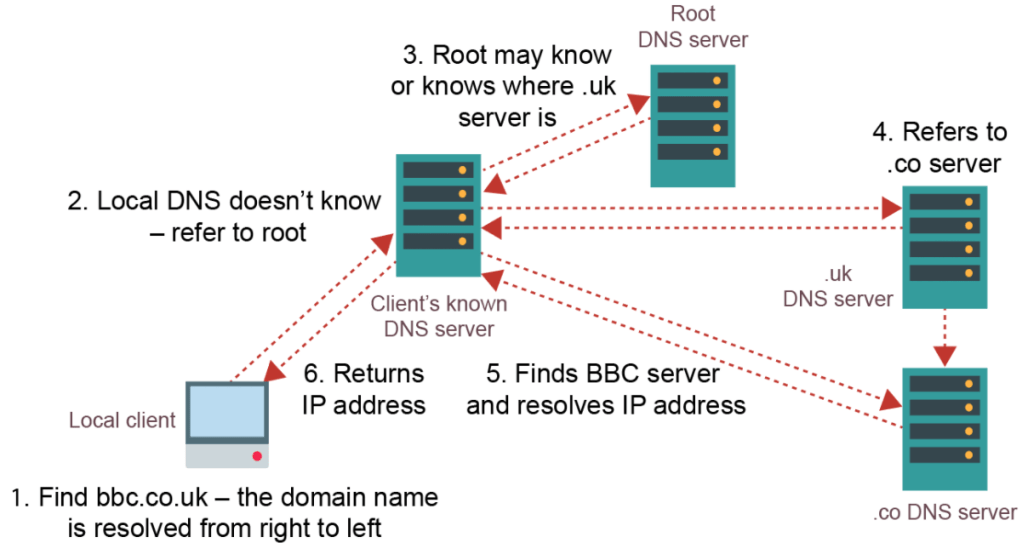
A domain name identifies the area or domain that an internet resource resides in. Each domain has a corresponding IP address. The DNS server stores a catalogue of all domain names and IP addresses. When a browser sends a request for a URL, it receives this URL and sends back the corresponding IP address which the browser will then use to connect to the resource. We use domain names instead of directly using IP addresses as they are easier to remember. For example:

The domain names are structured into a hierarchy of smaller domains.
IP Addressing:
Each node on a network has a unique IP Address. This works similar to a home address. It uniquely identifies each device on a network so data is sent to the correct destination.
IP Version 4 (IPv4) addresses are made up of 4 octet values (numerical values described by 8 bits) each separated by a full-stop. E.g: 14.132.250.10
There are about 4.3 billion IPv4 addresses, however these have now run out. A new version called IPv6 is now in use which provides up to 340 trillion trillion trillion addresses.
Internet Registries:
Internet Registries hold records of all existing domain names including currently available ones. These companies act as resellers for domain names and allow people to purchase them. They are also responsible for allocating IP addresses to domain names.
There are 5 global Internet Registries that are responsible for this.
Internet Communication:
Circuit Switching:
Circuit Switching is when a direct physical link between 2 devices is created for the duration of the communication, e.g a telephone box. This path stays connected even when there are period of silence. This does not work when there are millions of connections wanting to be connected at the same time. Also, because switches are used to connect and disconnect circuits, electrical interference is produced which lowers quality of speech or can corrupt/lose data. Because of this, packet switching was invented.
Packet Switching:
Unlike circuit switching, packet switching was developed so that communication channels can be shared so when one communication is temporarily not in use, another could use it.
Both split data into data packets but circuit switching uses a continuous flow of data packets but in packet switching, data packets contain destination and assembly information as they get sent along different routes. The route taken by each packet is calculated by the routing algorithm which decides the optimum route for a packet to reach its destination. They then arrive at the destination in a different order and they are sorted again using the assembly information.
Data Packets:
When sending data across a network, data is split into chucks called data packets which is then reassembled at the receiving end. The chunks need to be split into sensible sizes as too many small ones will create unnecessary excess data as header and trailer information is repeated many times and too large ones will hold up traffic behind it as it takes longer to send.
The latency is known as the time of travel of a data packet. E.g London to France may have a latency of 5ms.
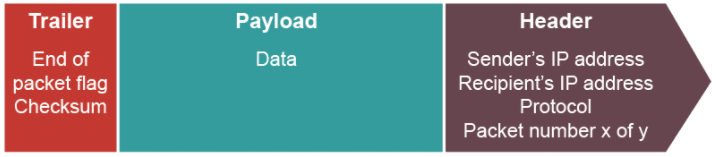
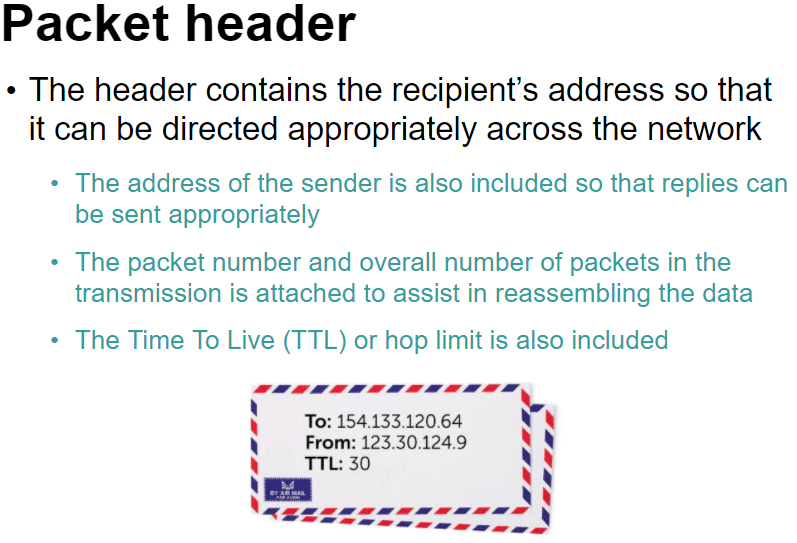
The TTL is the time at which point the data packet expires and is discarded.
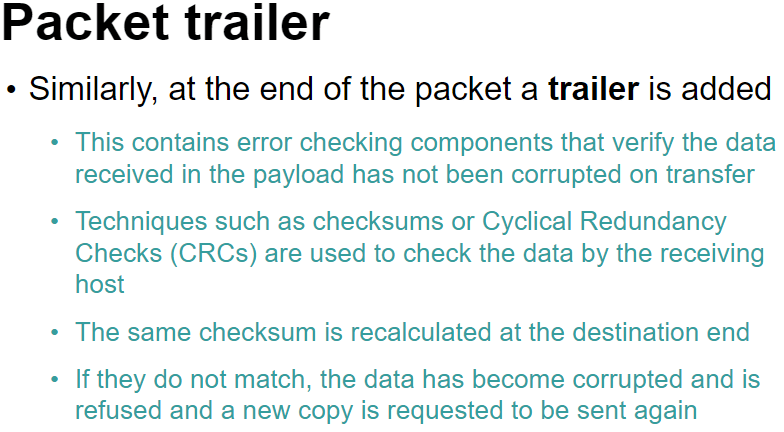
Protocol – A set of rules to determine how data is transferred between devices in a network.
Gateways:
This is used when routing packets from one network to another and the 2 networks use a different set of protocols because a router can only be used when they share the same protocols.
The global standard of networking protocols is the TCP/IP stack.
TCP/IP Protocol Stack:
This is a set of rules used to format a message to be sent over a network.
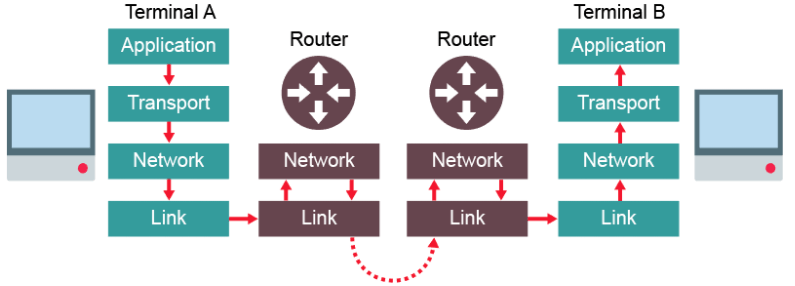
This protocol uses 4 connected layers. Each layer wraps the packets with its own data, like an envelope. When reaches the receiving end, it is unwrapped again.
- Application layer
- Transport layer
- Network layer (Or Internet layer)
- Link layer

Application Layer:
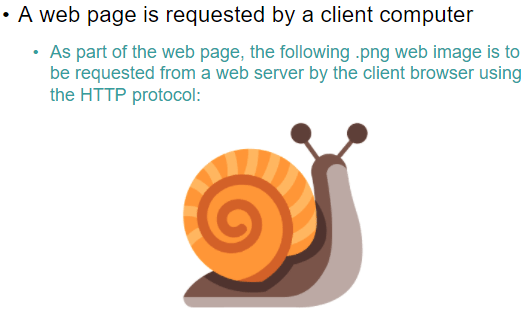
This layer is the highest abstraction level and provides the interfaces and protocols needed by the user. It provides services such as login, emails, file transfers and webpage display and chooses the suitable protocol based on which service is being requested by the user. For example, HTTP would be used to send the text data on a website.
Transport Layer:
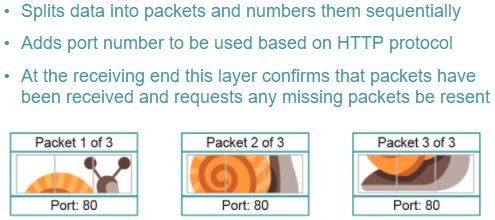
This layer uses the Transmission Control Protcol, TCP to establish an end-to-end connection with the recipient computer. The data is then split into packets and labelled with the packet number, total number of packets and the port number thorough which the packet should route. The port number ensures it is handled by the correct application on the recipient computer.
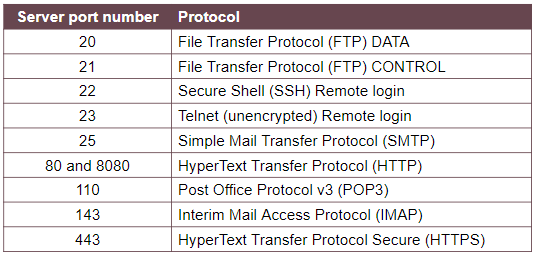
For example, port 80 is a common port used by the HTTP protocol which is usually the browser.
It also ensures all packets sent are received and can request retransmission if packets are missing.
Network Layer:
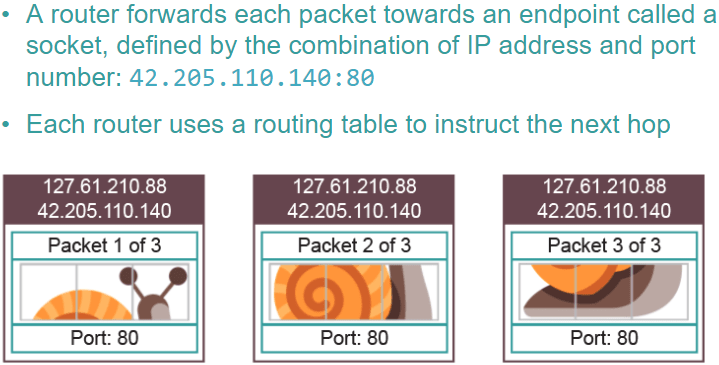
This layer adds the source and destination IP addresses. It adds the source address so it can return errors if needed. Routers inspect the IP address at this stage to calculate the optimum route to send the packet next.
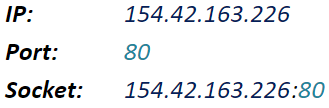
Together the IP address and the port number form a socket. The socket specifies which device it must be sent to, through the IP address, and the application on that device, through the port number.
Link layer:
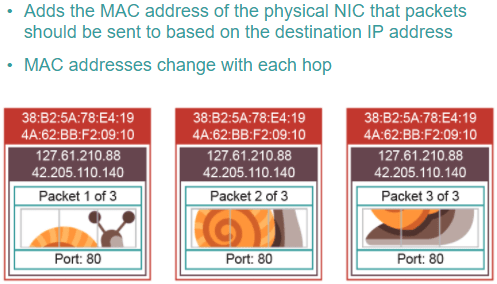
This layer is the physical connection between the nodes and adds the MAC address of the NIC of the source and destination computers. This is so that once the correct network is found using the IP address, it can then locate the correct piece of hardware using the MAC address. The destination MAC address is only the address of the destination router if it is being sent across networks. That’s why it needs the link layer when travelling between routers in the above diagram. If it is only within a network, the destination MAC address will be the destination device.
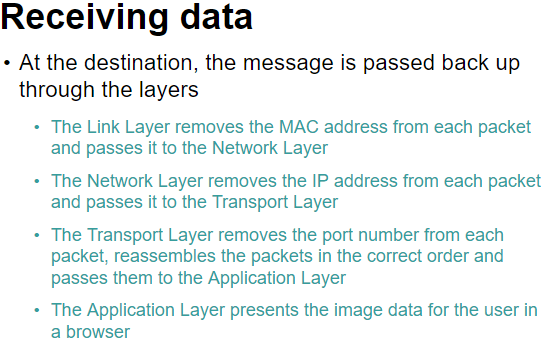
Media Access Control, MAC, addresses:
This uniquely identifies a physical device with its Network Interface Card, NIC. This may be the destination computer or the next router in transit.
Packets move up and down the Network and Link layer of the stack as they hop across routers, changing the source and destination MAC addresses as they go.
Port Numbers:
This identifies the application requires to deal with the data sent to the computer.
Together with the IP address they form a socket. E.G:
Common Ports:
Transferring files with FTP:
FTP is an application level protocol used to move files across a network. Often, usernames and passwords are used to protect the files for security purposes.
Sending and Receiving Email:
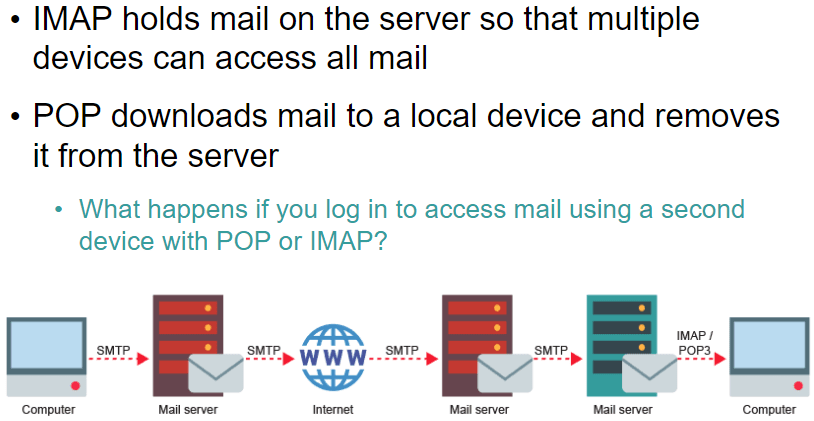
A mail server acts as a virtual post office for incoming and outgoing emails. They are dedicated computers that are responsible for storing emails, providing access to clients and providing services to send emails.
They use 3 protocols:
- SMTP – Used to send emails and forward them between mail servers.
- POP3 – Downloads email from the mail server to the local computer, deleting it from the server.
- IMAP – Manages emails on a server so multiple clients can access the same email simultaneously.
1.2.4: Modes of addressing
Immediate Addressing:
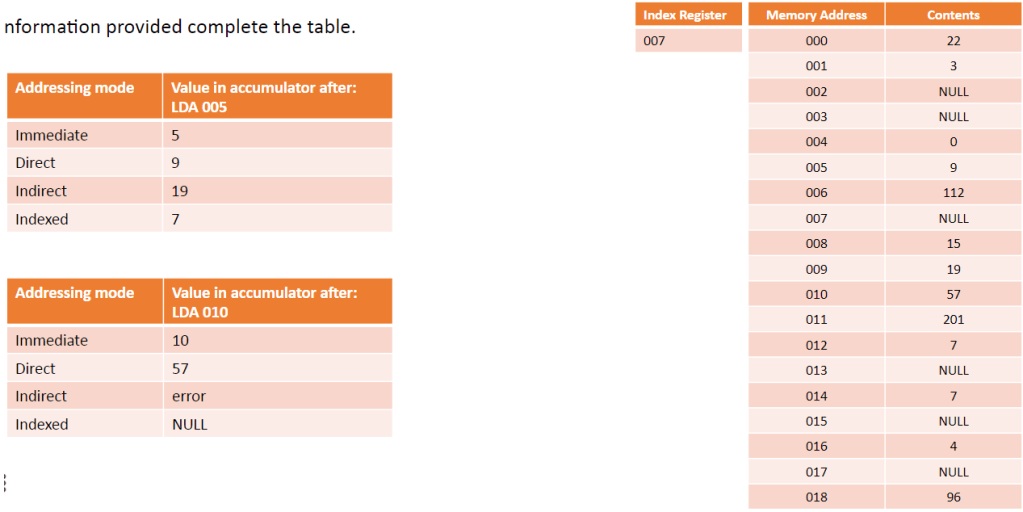
The instruction contains the data to be used. E.g: ADD 6 (add value 6 to accumulator)
This is the fastest method as it doesn’t involve having to go the the main memory.
Useful for carrying out instructions on constants opposed to variables.
Direct (or absolute) addressing:
The instruction points directly to a location in the memory. E.g: SUB 07 (sub value stored at memory location 07 from accumulator)
This method is fast but not as fast as immediate addressing. However, the code is dependent on the correct data value being stored at the location.
Indirect addressing:
The instruction points to a location in memory and the value stored here points to another location which stores the wanted value.
Indexed addressing:
An offset is added to the instruction and that is the location of the wanted value.
1.2.4 Types of Programming Languages
Programming Paradigms:
We need to know 3 types of paradigms: Procedural, Object Orientated and Assembly.
Procedural:
Languages such as Python and C.
Common characteristics of procedural programming:
- Instructions given in sequence
- Selection is used to make choices/branch out
- Iteration decides how many times something is done
- Programs often broken down into Procedures/functions
Object Orientated:
Languages such as C++ and Java
Programmers develop objects based on the real world which interact with eachother.
Assembly:
This is code that is written for a specific processor.
2.2.1: Programming Techniques
Integrated Development Environment, IDE:
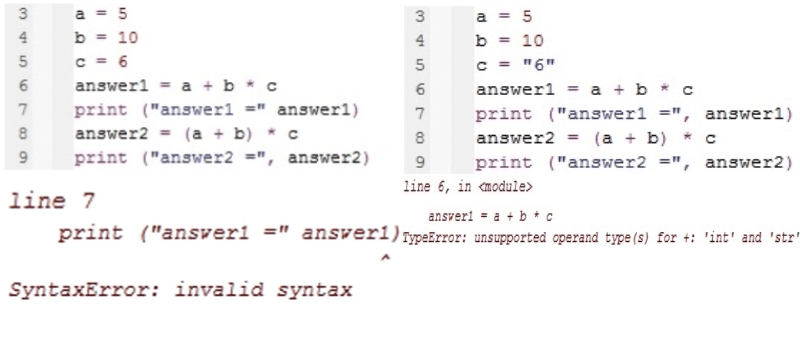
An IDE is software that enables you to enter, edit, compile and run programs. Many also have debugging faclities to help find errors.
Debugging facilities include:
- Set a breakpoint which will stop the program on that line.
- Set a watch on a variable so its value is displayed when it changes.
- Step through a program one line at a time
- Trace the execution of a program- e.g: display a message when a particular statement is executed.
IDE’s offer many specific features designed to make entering code as easy as possible:
- Line Numbers
- Automatically indent code
- auto-complete commands
- comment/uncomment a region
The IDE will also identify and tell you the location of a syntax or logical errors.
The 3 basic programming constructs
Sequence – The order in which the code is executed
Selection – Boolean instructions such as if, else
Repetition – Iteration/Recursion.
Algorithms
Algorithm – A sequence of instructions that can be followed to solve a problem.
Pseudocode
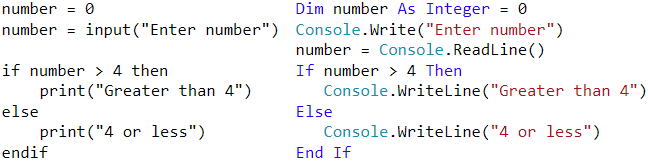
Pseudocode is used to write instuctions in statements that are between english and programming language.
There arent strict rules to stick to .
It acts as an aid to thinking out steps before you start coding.
Comparing:
Variables and Assignment
Variables and Constants
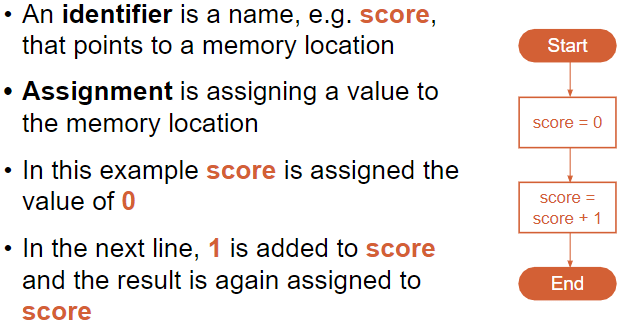
The value of a variable can be changed while the program is running.
To change the value of a constant, you need to change it in the source code then recompile. A constant cannot be a target of an assignment, it will cause an error.
Constants reduce the risk of errors by reducing accesss to memory location.
Local Variable – Declared and used only inside the sub-routine that it was declared in. Created when routine is called and destroyed when it ends.
Global Variable – Declared at the top of a program outside of sub-routines. Usable throughtout the program. Created when program starts and destroyed when it ends.
The mod and div operators
mod is used to find the remainder in integer division
div returns the integer part of the division
x = 17 mod 3 : sets x = 2
y = 17 div 3 : sets y = 5
Iteration
This means repetition. In programming such as python, you can make an iteration by creating a loop with, for example, a while loop. This is a much more efficient alternative than writing the instruction multiple times.
Subroutines
A subroutine is a set of instructions with a name.
Procedures and functions are both types of subroutine. A function is a subroutine that returns one or more values. In most languages subroutines are referred to as functions even if no value is returned. Procedures dont have to return a value.
There are many built in functions such as len() or round(). And you can also import additional modules from the module library. E.g in python you can import random to get randint()
Parameter and arguments are closely defined. E.g:
function(x) = x*x
The x is the parameter and if i were to call the function, function(8), the 8 is the argument.
Parameter – The defenition of the argument
Argument – This is the value passed onto the function
However these defenitions can be used interchangeably.
The scope of a variable means where in the program it can be used. E.g: the scope of a local variable is the subroutine in which it was declared. It does not exits outsdie of that subroutine. The scope of a global variable is everywhere.
Parameter Passing
This is where you give a function a parameter while it is running. This enables the user to specify the parameter.
E.g: To show the 10 times table:
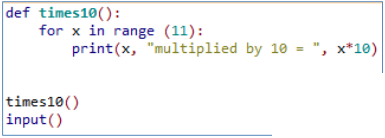
To let the user choose which times table to display it without parameter passing would look like this:
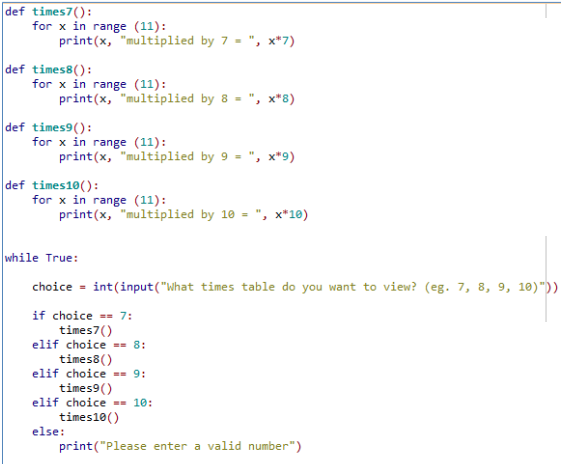
Using parameter passing:
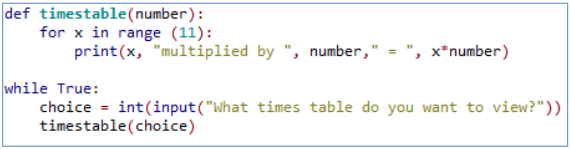
Parameter passing is essentially timestable(number). You can have multiple parameters, seperated the commas.
Recursion
Essentially “A subroutine/function which calls itself.”
The act of the subroutine calling itself from within its own subroutine is recursion
A recursive subroutine must have these 3 characteristics:
- Must contain stopping condition (base case)
- For any input values other than the stopping condition the routine must call itself (recursion)
- The stopping condition must be reachable after a finite number of times. (or recieve an error called stack overflow).
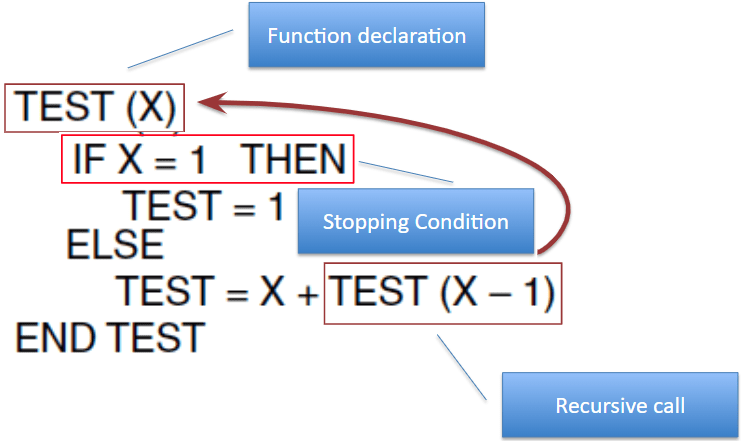
Downsides to Recursion:
- Often requires extra storage space
- Can become endless without a strong exit condition
- Typically not efficient in speed and time.
Therefore best to use “normal” iterative approach where possible.
Example: Countdown function
def countdown_rec(n):
    if n == 0:
        exit
    else:
        print(n)
        countdown_rec(n-1)
Iteration Vs Recursion:
Recursion requires more memory than iteration as it needs to create multiple instances of itself whereas iteration runs through it one at a time. However iteration usualy needs more lines of code than recursion. Generally iteration is preferred over recursion.
OOP Course Notes
Week 1:
What an object is and how we can use objects in a program. We know that objects come from a class, which is like a blueprint, and that we can customise the attributes of an object as well as call methods on it.
Each object starts with the same attributes, but we can change each object individually, as each object is a separate instance of a class,
Glossary
Attribute – A named piece of data stored within an object. E.g: color command for turtle.
Class – A blueprint for making an object. E.g: when you create a shape, rectangle.
Instance – A specific example of an object. E.g: rect1=rectangle() rect1.set_color(“blue”)
Method – A function called upon an object allowing interaction with that object. E.g: forward command for turtle.
Object – Groups together data and functions to model something in code. Examples could include a physical item such as an LED, or a digital unit such as a bank account or an enemy in a video game
Object-oriented programming – A different style of programming.
Getter – A method whose purpose it is to get a value within an object.
Setter – A method whose purpose it is to set a value within an object.
Week 2:
Writing our own class, instantiating objects of that class with custom attribute values, and using the object’s methods to interact with it.
A class is a blueprint for creating an object.
To create an object using the class we call the method called the constructer (__init__). We can then assign attributes inside the constructer.
We also give it methods to tell it what do to.
Each object we create is an instance of its class.
Glossary
Constructor – A special method to tell Python how to create an object of this class: in Python, the constructor method is always called __init__ with a double underscore on each side of ‘init’
Dictionary – Similar to a list, but allows you to give each element a name
Element – One item in a dictionary
Getter – A method whose purpose it is to get a value from within an object
Instantiate – Create an object of a particular class
Parameter – A way of providing data so that it can be used within a method
Self – Used within the code for an object to mean ‘this object’
Week 3:
Concepts of inheritance, polymorphism, and aggregation.
A subclass inherits it’s attributes and methods from the superclass. You use inheritance to modify the subclass to suite the needs.
Polymorphism allows us to treat a subclass as if it is an object of the superclass.
Glossary
Aggregation – When an object contains an instance of (or ‘has a’) another object.
Extend – A class which uses the functionality of an existing class, but also adds to or overwrites some of it
Inherit – A class that inherits from another class is able to use all of the attributes and methods from that class
Polymorphism – If a class inherits from another class, it can also be considered to be (‘is a’) object of that class
Subclass – Inherits the properties of another class and adds some specialised methods of its own
Superclass – Provides methods and attributes which are used by another class
1.4.2: Data Structures
Data Structure – This is a way of representing/organizing data held in a computer’s memory to be used efficiently.
Data structures fall under 2 categories: Static or dynamic.
Static:
The size is set at the beginning of the program when it compiles and can not be changed. This is very limiting and inefficient as you need to know in advance how large you data structure needs to be. However, static data structures are easy to program and you know how much space they will take up.
Advantages:
The memory allocation is fixed and so there will be no problem with adding and removing data items.
Easier to program as there is not need to check on data structure size at any point.
Disadvantages:
Can be inefficient as memory for the data structure has been set aside regardless if it needs it or not.
Dynamic:
The size does not have a limit but can be more complex to implement. Memory is allocated to the data structure dynamically, as the program executes.
Advantages:
Makes the most efficient use of memory as data structures only uses as much memory as it needs.
Disadvantages:
Because memory allocation is dynamic, it is possible for the structure to overflow if it exceeds its allowed limit.
Harder to program as software needs to keep track of its size and data item at all times.
It is also very common for more complex data structures to be made up of simpler ones. For example, it is normal practice to implement binary trees using a linked list.
Arrays:
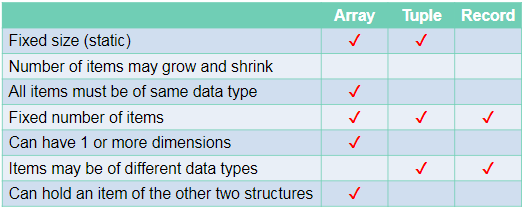
An array is a static data structure which can have multiple dimensions.
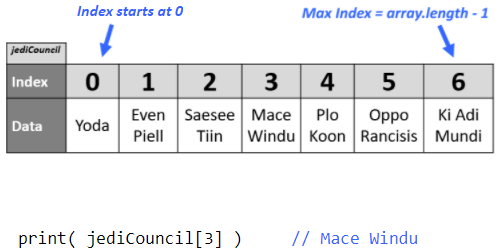
One Dimensional:
Each item in the array is assigned an index value starting from 0.
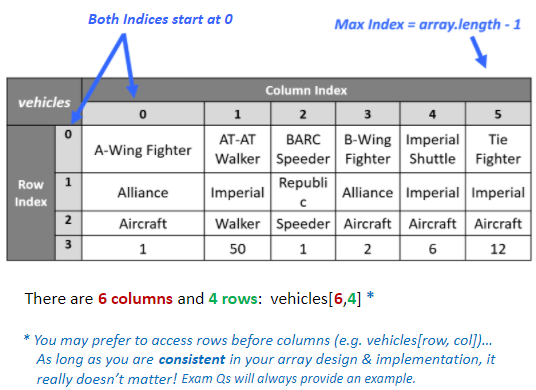
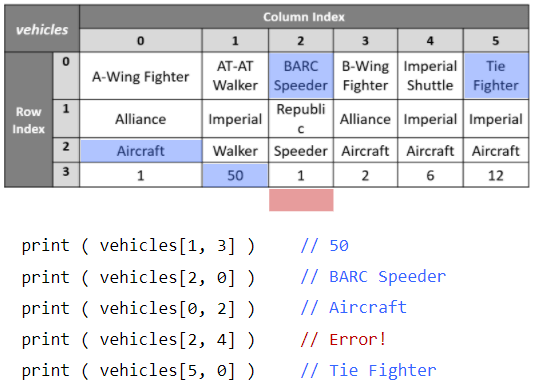
Two Dimensional:
Each item is assigned 2 index values. x and y.
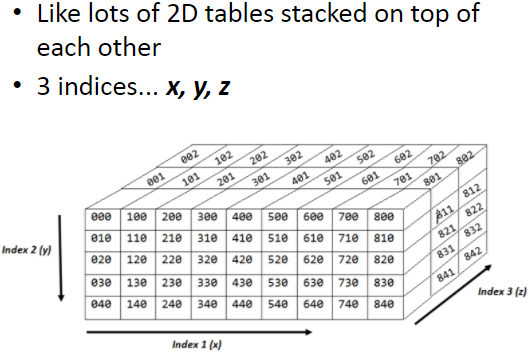
Three Dimensional:
Each item is assigned 3 index values. x, y and z.
Tuples:
Tuples are very similar to one dimensional arrays but with 2 important differences:
Firstly, tuples cant be edited once they have been assigned (immutable)
Secondly, tuples can contain values of different types unlike arrays where every item must be the same type.
Records:
A record is used to organise data by an attribute.
- They are composed of a fixed number of fields of different data types.
- Can be treated as a tuple.
Stacks:
This is another method for handling linear data lists.
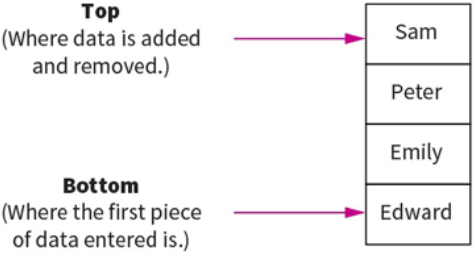
Stacks are last-in first-out (LIFO) data structures. This means that the most recent piece of data added to the stack is the first piece to be taken off it. Meaning to get to the bottom piece of data you need to “pop” out the above data to get to that piece. e.g: teacher puts textbooks on the top of a pile and students take it from the top. Example: like a stack of pancakes.
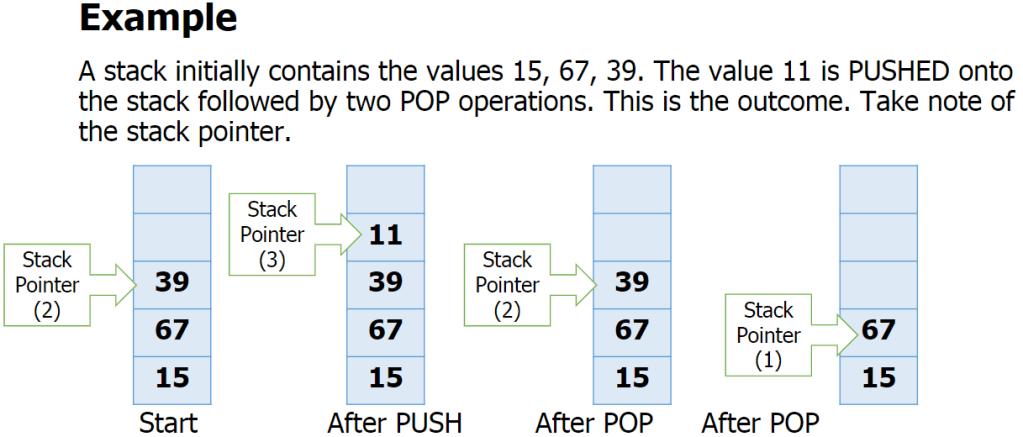
Adding data to the stack is called pushing and taking data off the stack is called popping.
A stack within a computers memory system is implemented using pointers. The pointer is always pointing to the top item in the stack.
The basic operations for a stack are:
- Adding/removing from the top
- Checking if the stack is full/empty
Basic operations:
push(item) – adds item to the top of the stack
pop() – removes and returns the item on the top of the stack
isFull() – checks if the stack is full
isEmpty() – checks if the stack is empty
also:
peek() – returns top item without removing it.
size() – returns the number of items in the stack
Overflow – attempting to push onto a stack that
is full
Underflow – attempting to pop from a stack that
is empty
Queues:
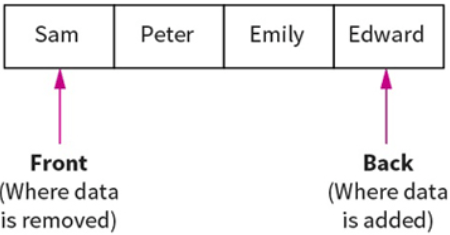
Queues are First In First Out (FIFO) data structures. This means that the most recent piece of data to be placed in the queue is the last piece taken out. Example: At a restaurant, the first person to queue is the first to get their order and leave the queue.
Data within a queue does not physically move forward in the queue. Instead two pointers are used to denote the start and end, to track data items within the structure.
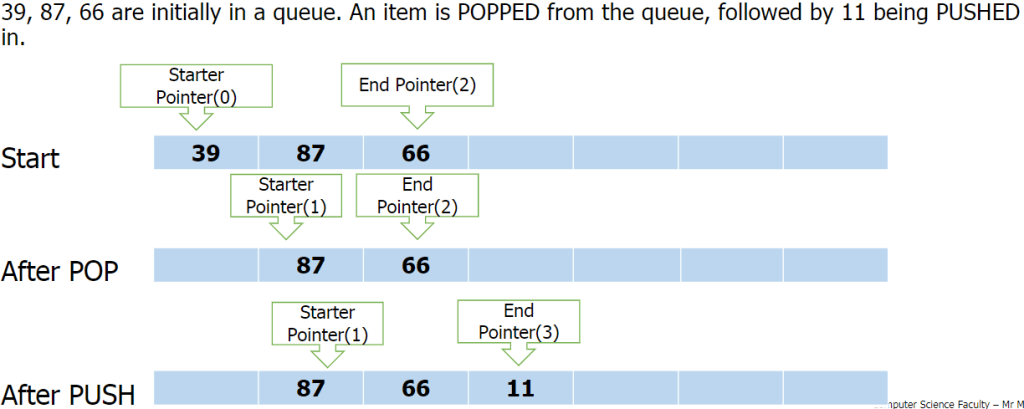
Queue functions/methods:
- enQueue(item) – Add an item to the rear.
- deQueue – Remove and return an item from the front.
- isEmpty – Indicates if the queue is empty.
- isFull – Indicates if the queue is full.
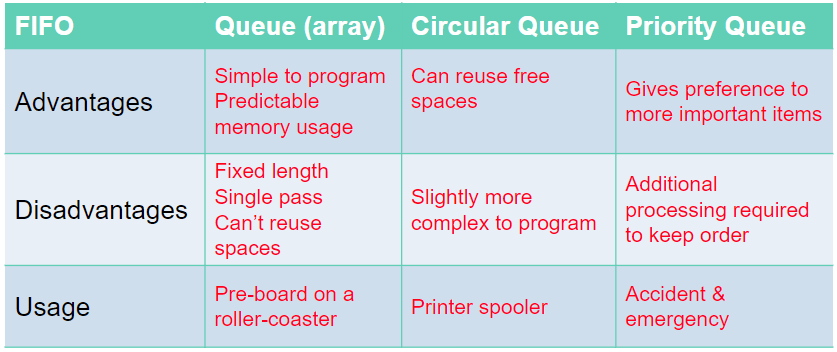
Problems with queue as an array:
- Problems arise with the implementation of a queue as a fixed-size array
- How many items can be added? Or removed?
- What happens when the queue is full, but there are some free spaces at the front?
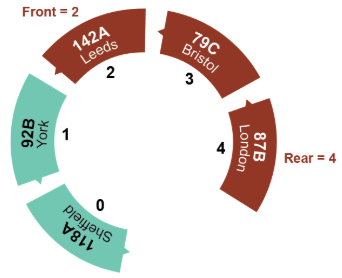
Circular Queue:
A circular queue algorithm overcomes the problem of reusing the spaces that have been freed by dequeueing from the front of the array.
Priority Queue:
In a priority queue some items are allowed to ‘jump’ the queue. Certain items coming in may have some sort of priority to it so it will join the front on the queue.
Lists:
Similar to 1D array.
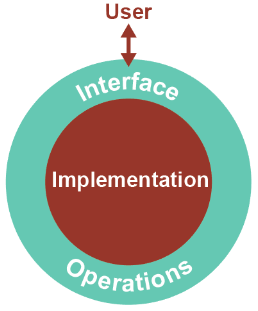
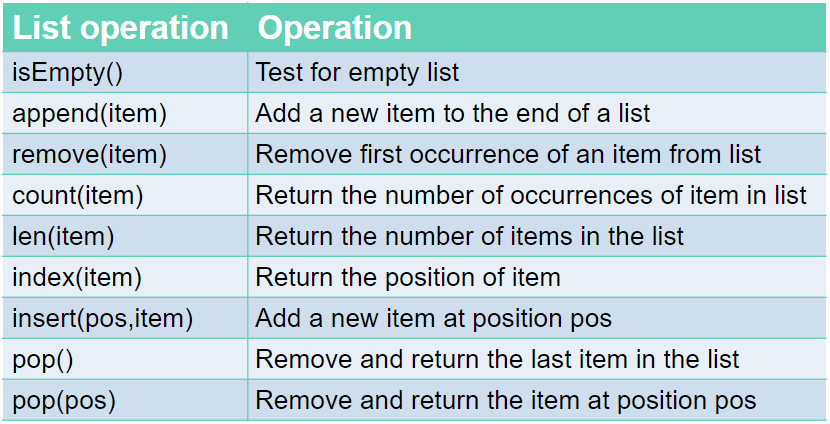
Just like a queue, a list is an abstract data type. An abstract data type, ADT, allows the user to view and perform operations on the data without know how it is implemented/works.
Commands:
Linked Lists:
Linked lists are one of the most popular type of dynamic data structure. Being dynamic means they can grow whatever size they want.
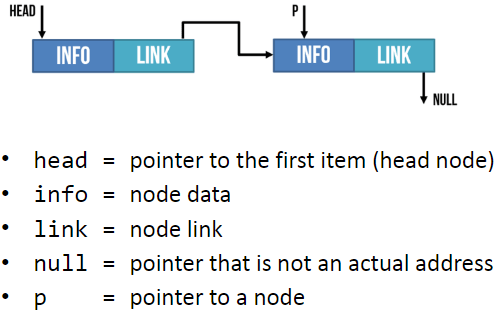
It is composed of ‘nodes’. Each node is linked to the next node in the list.
Each node is composed of 2 parts: The data and a pointer to the next piece of data in the list.
Adding new data to the end of the linked list you create a new node then you update the last item so it points to the new item.
When searching a linked list, you start at the first node and go through the linked list until the desired value is found or until it reaches the end and it is not contained in the linked list.
Hash Table:
The Abstract Data Structure called a hash table can find any record in the dataset almost instantly, no matter the size of the dataset.
This is done by assigning an address to each data item which is calculated from the data itself using a hasing algorithm. The algorithm uses some part of the record, e.g: the primary key, to map the record to a unique address. The resulting data structure is a hash table.
E.g:
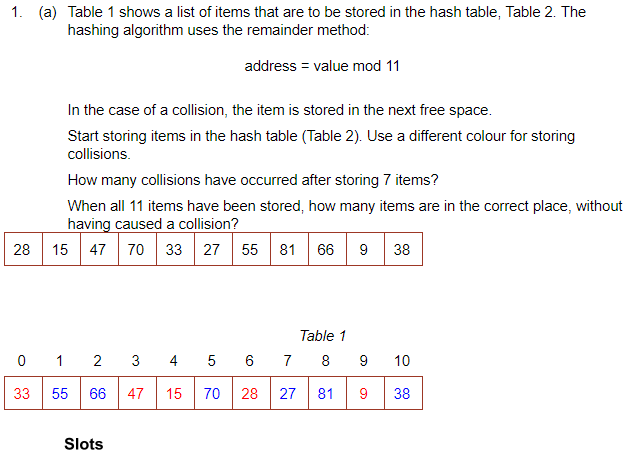
To search for an item you would mod the value and go to the address. If it is not there, go along the table by the skip value until it is found.
There are many other hasing algorithms but they all use the mod function at some point.
When you delete something, it must be replaced with a dummy item such as ‘deleted’. This is because when searching for an item, it keeps looking until it is found or an empty space is found.
The Mid-Square Method:
- First Square the item
- Extract some portion of the resulting digits
- perform the mod function to get an address.
E.g: 562 = 3136
Middle 2 digits = 13
13 mod 11 = 2 = address
The Folding Method:
- Divide the nuber into equal sized pieces (last number may not be equal size)
- Add the pieces together
- Perform mod function to get address
E.g: Store 34721062
34 + 72 + 10 + 62 = 178
178 mod 11 = 2 = address
Collosions:
This is when an algorithm generates the same address for different keys. However good the algorithm is, it is impossible to avoid collosions.
To resolve a collision, the simplest method would be to put the item in the next free slot. However, this can lead to clustering in the table. Alternatively, you can increment the ‘skip’ value by adding 1, 3, 5, 7 etc instead of incrementing by 1
Hashing alphanumeric data:
Alphanumeric data may be converted to numeric data by using ASCII code for each character, then applying a hashing algorithm to the result.
E.g: cab
c = 99 a = 97 b = 98
99+97+98 = 294
294 mod 11 = 8 = address.
A Dictionary:
A dictionary is an abstract data type made up of associated pairs.
Each pair has a key and a value.
The value is accessed by the key.
A dictionary is a very useful data structure for any application where items need to be looked up.
E.g:
- In a computer, the ASCII
- Translation
Multiple items with the same keys are allowed.
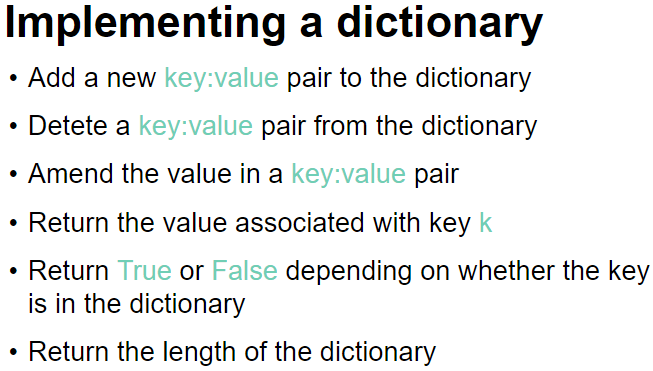
The key:value pairs are not held in any particular sequence. The address of the pair is calculated using a hashing algorithm.
Operations: (In python)
To retrieve a value- dictionaryname[‘key‘]
To insert /update a key-value pair- dictionaryname[‘key‘] = value (when you give a key that is already in the dictionary, it will update its value instead. If it doesnt find the key, it will create a new one.
To remove a key-value pair- del dictionaryname[‘key‘]
To check if a key exists- ‘key‘ in dictionaryname
Binary Trees:
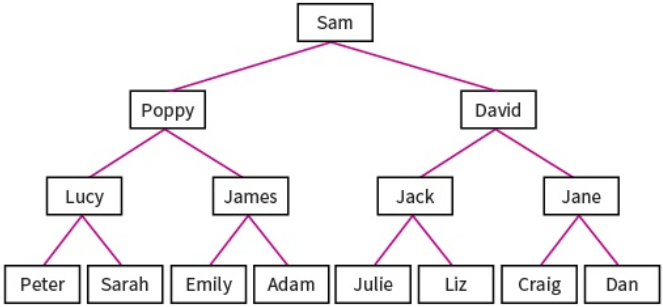
Binary trees are composed of nodes, (sometimes called leaves) and links between them (sometimes called branches). Each node can only have up to 2 branches coming from them, often called left child and right child.
Binary search trees are very useful as they have many advantages:
- Trees reflect structural relationships in the data.
- Trees are used to represent hierarchies
- Tress provide an efficient insertion and searching
- Trees are very flexible data, allowing to move subtrees around with minimum effort.
Binary trees are used to implement another data structure called binary search tree. These are identical to binary trees but have the additional constraint that the data on the left branch of a node must be less than the data in the right node. Likewise the data on the right branch of the node must be greater than or equal to the data held in the node.
The RULE: The LEFT node always contain values that come before the root node and the RIGHT node always contain values that come after the root node.
For numeric, this means the left sub-tree contains numbers less than the root and the right sub-tree contains numbers greater than the root. For words, the order is alphabetic. A to left, Z to right.
Example:
Sequnce 20, 17, 29, 22, 45, 9, 19
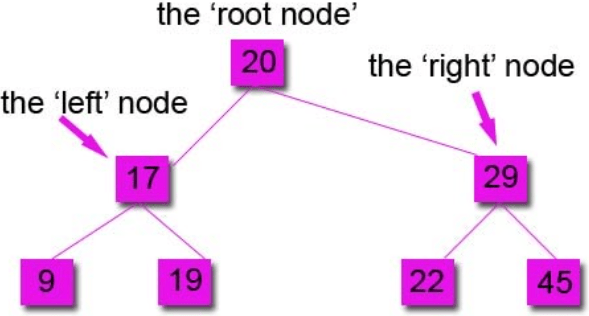
You always compare to the root node first to see if it goes left or right.
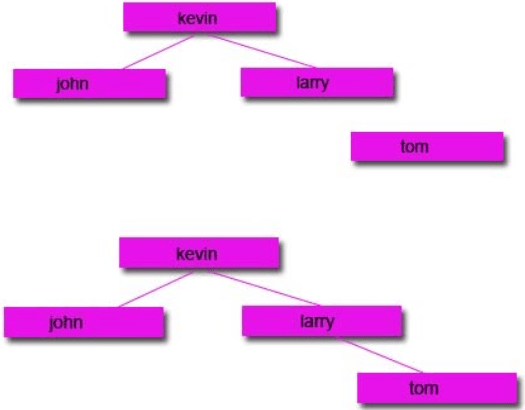
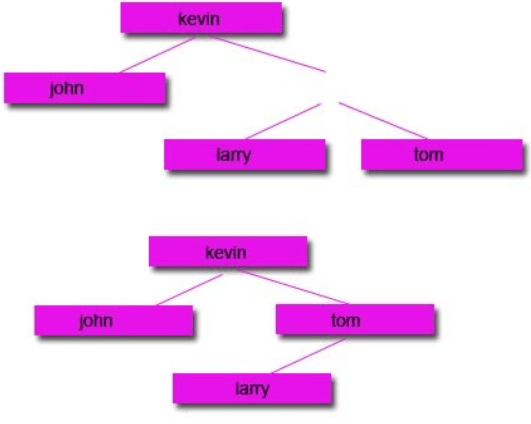
Subtracting Nodes:
There are 2 ways to do it:
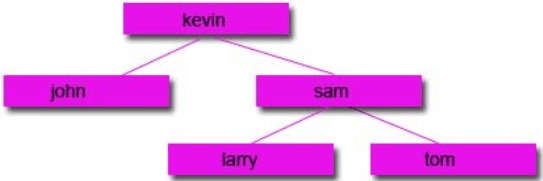
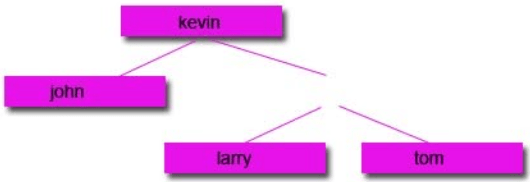
1: Remove the node and move the left node up and attach to the parent node and attach the right node to the right of the left node.
2: Remove the node and move the right node up and attach to the parent node and attach the left node to the left of the right node.
Start with a tree:
Then remove the node you want:
Option 1:
Option 2:
Traversing data:
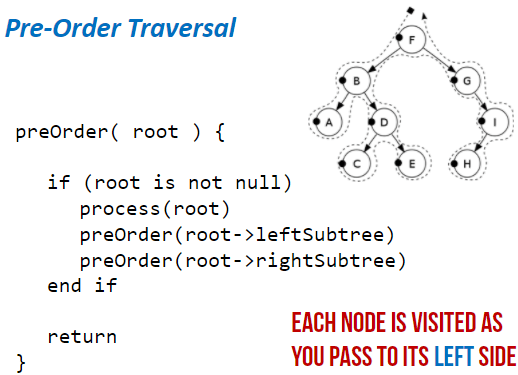
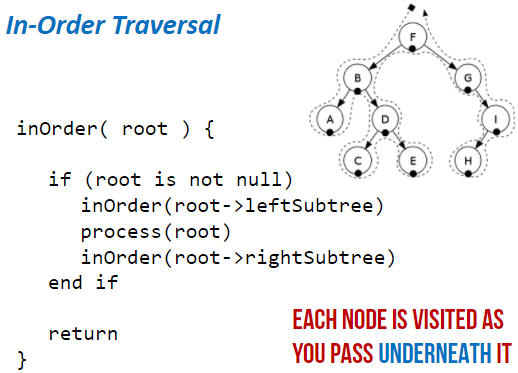
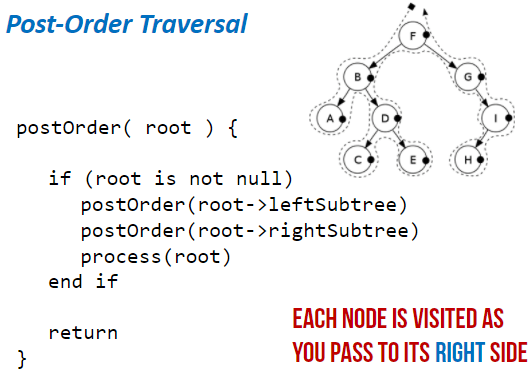
Unlike stacks and queues, there is a range of different ways to traverse binary tree data structures. In computer science, traversal refers to the process of visiting (examining and/or updating) each node in a data structure exactly once, in a systematic way. Each method will return a different set of results, so it is important that you use the correct one.
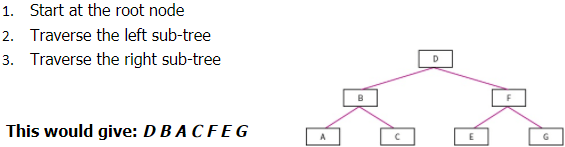
Pre-order Traversal: (Type of Depth First Search)
- Start at root node
- Traverse left sub-tree
- Traverse right sub-tree
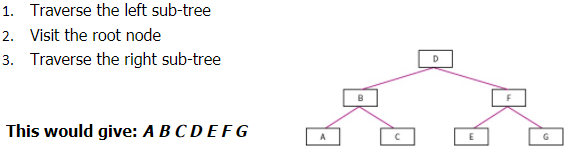
In-order Traversal:
- Traverse the left sub-tree
- Visit the root node
- Traverse the right sub-tree
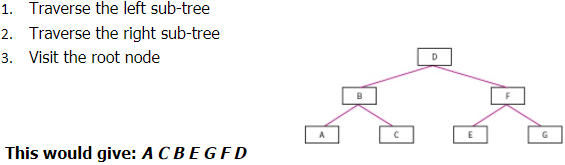
Post-order Traversal:
- Traverse the left sub-tree
- Traverse the right sub-tree
- Visit the root node
Level-order Traversal: (Type of Breadth first)
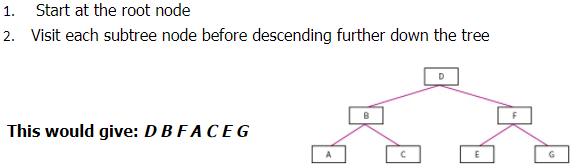
- Start at the root node
- Visit each sub-tree node before descending further down the tree
Hash tables:
The disadvantages of arrays and linked lists is that if you don’t know the storage location and the data is not ordered, then it can take a while to find the data item. Hashing fixes this. When you enter a data item, a hashing algorithm is applied to the data item and it turns it into the actual index that it will be stored at. This is beneficial because only a simple hashing algorithm is needed so it will be quick and it will give you the exact location of where it is stored in the memory so it will be quick to locate it.


Example:
A database of customers, each record of holding details about a different customer. As it is not known how big the database will become and because data is deleted and added frequently, these record will not be held together in order in the memory. Because of this, locating a record would potentially take a lot of time because we don’t know the index of each record.
To overcome this, a hashing algorithm is applies to each record. This will change it into the index that it is stored at. Now when you search for it, it will apply the hashing algorithm to the search item and it should point to the index of the item.
A common hashing algorithm that is used for 1000 spaces of available memory locations is index = value MOD 1000
Collisions:
This is when the data item is processed through the hashing algorithm and it outputs an index that is already in use. If this happens, the next free index is used.
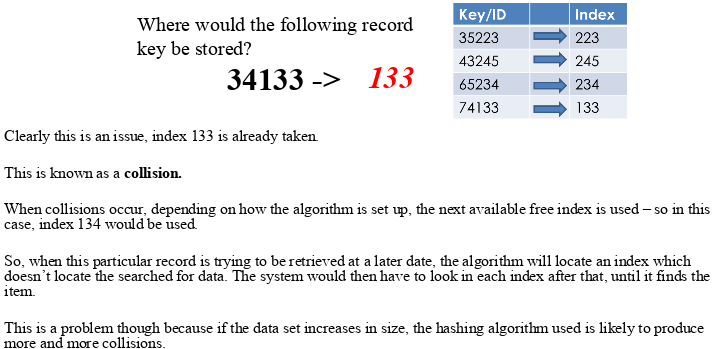
However, some algorithms deal with collisions differently.
Instead of adding the hashed data to the next available index, it will attach a new array/list to the index and add the data to that. So more than one data item can be placed at the same index but into an array at that index.
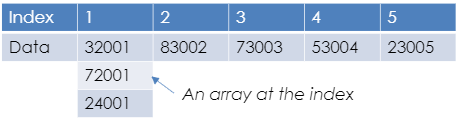
This doesn’t help with the time taken to locate the data as once it is searched for, it needs to search the array as well.
When designing a hashing algorithm there are things that need to be aimed for:
- Produce the least possible collisions
- Be as quick as possible. At least faster than another search method.
All data types can be hashed, even strings. This is because each character in a string is in fact an ASCII value. Images can be hashed because image files are in fact a set of pixels which are each stored as a binary number. Sound files can be hashed because sound files are a set of samples which are binary numbers representing frequencies of sound.
Graphs:
This is a dynamic data structure. It is versatile and is often used in navigation systems, data transmission, web pages and social media trends.
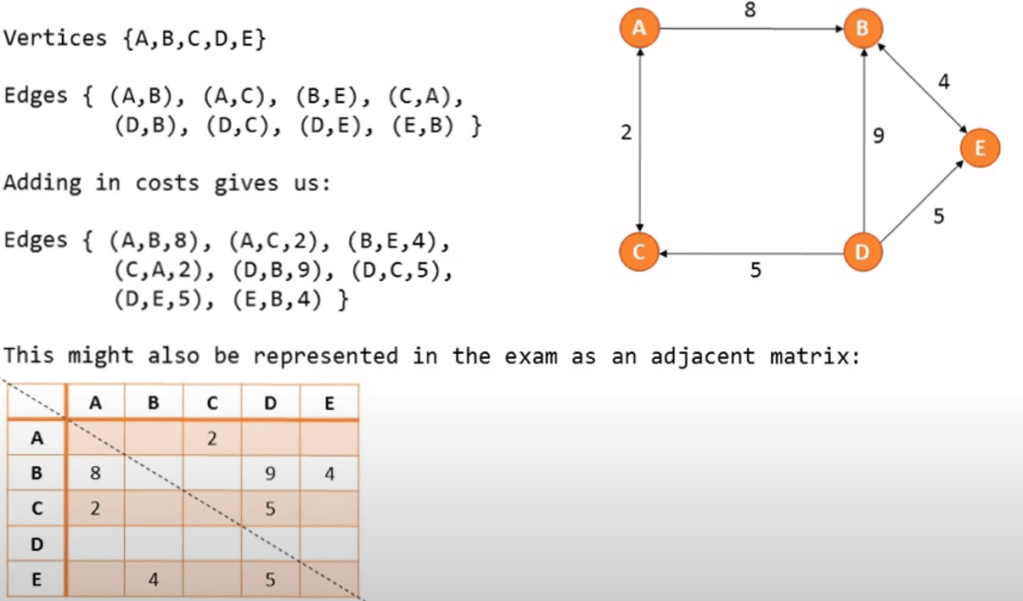
On a graph the nodes are called vertices and the lines are called edges. Edges may be weighted
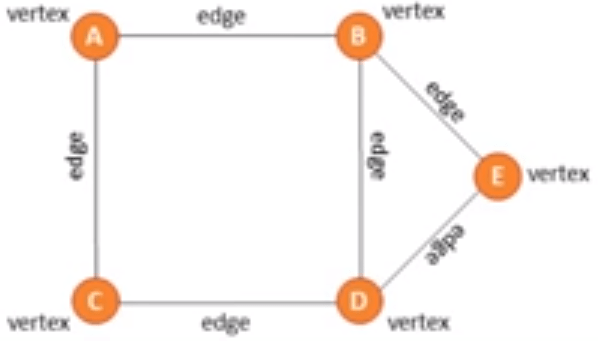
There are directional and unidirectional graphs.
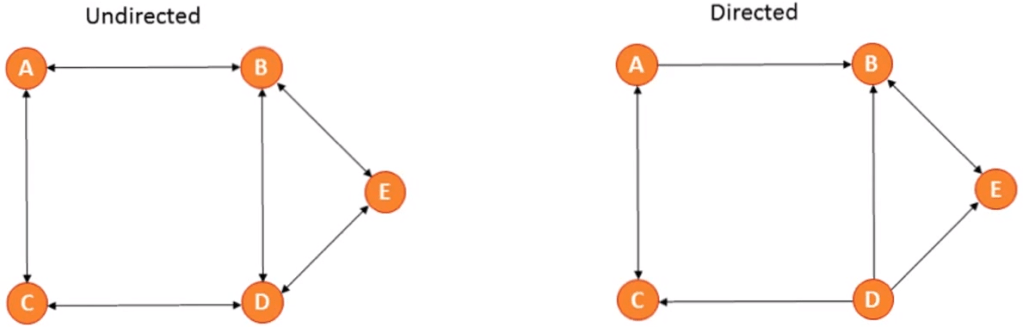
You can represent a graph in 2 ways:
Traversing a graph:
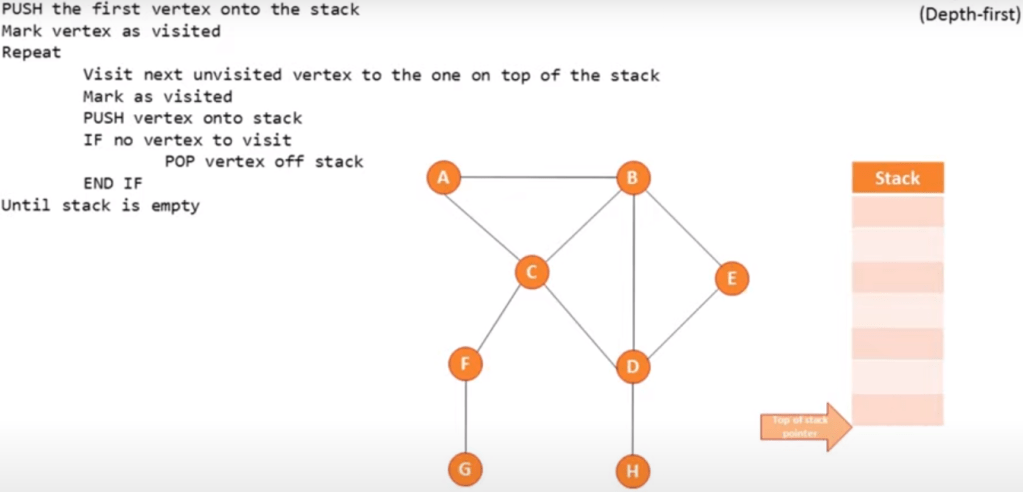
Depth first (using a stack):
Start at the root and follow one branch as far as it will go, then back track.
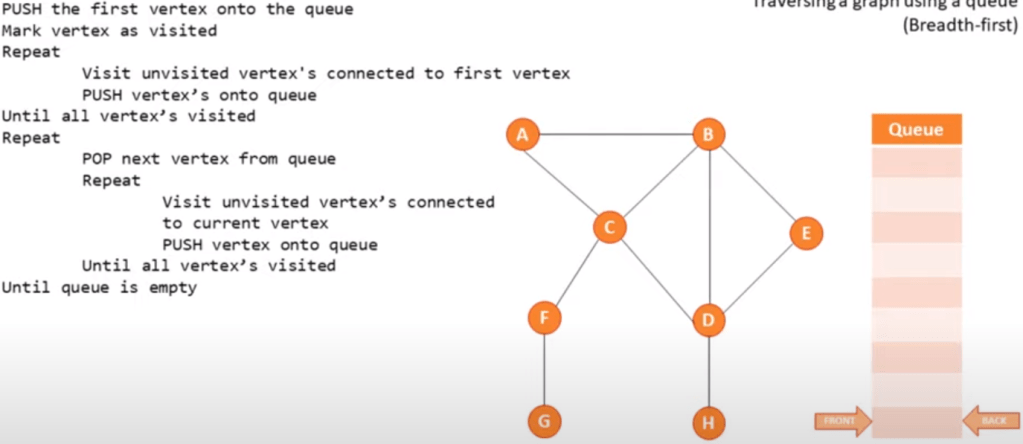
Breadth first (using a queue):
Start at the root, scan every node connected and then continue scanning from left to right.
Pseudo code example:
Software Methodologies
Software development life cycle (SDLC)- The process of developing software with high quality with low cost and time.

Different Methodologies:
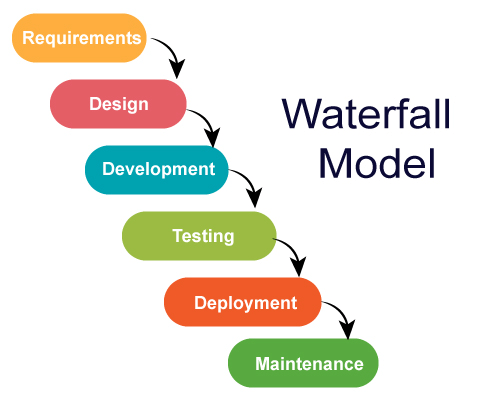
Waterfall Method:
This was the first process model to be introduced. It is a simple and easy to use process, which is recommended for smaller projects.
6 Stages to the Waterfall Method: Requirements, Design, Development, Testing, Deployment, Maintenance.
Requirements: The potential consumer requirements of the project are analysed and written down for future reference so that future phases does not require further customer interaction until the application is complete.
Design: There are 2 parts. Logical and physical design subphases. Logical subphase is when possible solutions are brainstormed and the design subpahse is when the ideas are put into concrete specifications.
Development: When programmers bring together the requirements and specifications to create actual code.
Testing: After code is created it is sent out to beta testers to find bugs in the program.
Deployment: When the finished program is sent out to consumers for use.
Maintenance: The need for the creators to continually update the programs to correct flaws and upgrade the system according to consumer needs.
Advantages:
- Simple and easy to understand and use.
- Easy to manage.
- Each phase is completed one at a time, they do not overlap.
- Works well with smaller projects.
- Easy to manage due to rigidity of the model.
Disadvantages:
- Once application is in testing phase, it is very difficult to go back and change something.
- No working software is produced until late in the cycle.
- High amounts of risk and uncertainty.
- Not a good model for large, complex projects.
- Not good for projects where requirements are likely to change.
- The client is only involved at the beginning and the end so if they are unclear at the beginning the project could fail.
When to use the Waterfall model:
- Requirements are very known, clear and fixed.
- When there are no ambiguous requirements.
- Ample resources with required expertise are available.
- Project is short.
Spiral Method:
This method goes through the 4 phases multiple times in an iterative process. Each time is an iteration (or spiral in this case). Heavy emphasis is based on risk assessment in this model.
There are 4 phases to the spiral model: Planning, Risk Analysis, Engineering, Evaluation.
These repeat in an iterative process until final product is made.
Planning: Requirements are collected from consumers and aims are recognized and analysed.
Risk analysis: The identification of risks are carried out and solutions are laid out and the best are picked out. The different risks linked with the chosen solutions are then recognized and resolved. A prototype is then produced after this analysis.
Engineering: Here, the software is developed and tested at the end of the phase
Evaluation: This phase allows the customer to evaluate and give feedback on the prototype before the next iteration of the spiral is carried out.

Advantages:
- Greatly reduced risk as risk analysis is involved.
- Good for large, important projects.
- Strong documentation and approval process.
- Additional features can be added later.
- Software is produced early in the cycle.
Disadvantages:
- Can be an expensive model to use.
- Risk analysis requires highly specific expertise.
- Project success is highly dependent on risk analysis phase.
- Does not work well with smaller projects.
When to use Spiral Model:
- When costs and risk evaluation is important.
- For medium to high risk projects.
- Requirements are complex.
- Users are unsure of their needs.
- When it is for a new product line.
- Significant changes are expected during the cycle.
Agile Model:
This model differs significantly from the other models in the sense that it is able to adapt and change quickly and easily according to change in demand. Like the spiral method, this has multiple iterations but are much shorter in duration of each iteration.
In this method, there are no separate phases, everything is done in one phase.
Agile software development refers to a group of software development methodologies based on iterative development.
Advantages:
- Customer satisfaction from rapid, continuous delivery of useful software.
- Customers, developers and testers constantly interact with each other.
- Working software is more frequently delivered, (Weeks rather than months).
- Able to regularly adapt to changing circumstances.
- Even changes late in the process are welcomed.
- Efficient code/ few bugs.
- Quality of code is very high.
Disadvantages:
- In some projects, especially large ones, it is difficult to assess the effort required at the beginning of the cycle.
- Lack of emphasis on the documentation of the process.
- Project can easily be taken off track if consumer representatives are not clear.
- May be difficult for inexperienced programmers to do.
- Increased development cost.
Extreme Programming:
This is a type of agile model.
There are 5 key values of XP: Simplicity, Communication, Feedback, Respect, Courage.
Simplicity: Work done will only be what is needed and asked for and no more. This maximizes efficiency.
Communication: Everyone involved in the development process will communicate face to face daily. Everything in the cycle is worked on together.
Feedback: Every iteration is delivered as working software. Feedback is taken on board and changes are made accordingly.
Respect: Everybody who has contributed feels respected and valuable.
Courage: Tell the truth about progress and time estimations. Excuses for failure are not documented. Adaptation to changes are made if necessary.

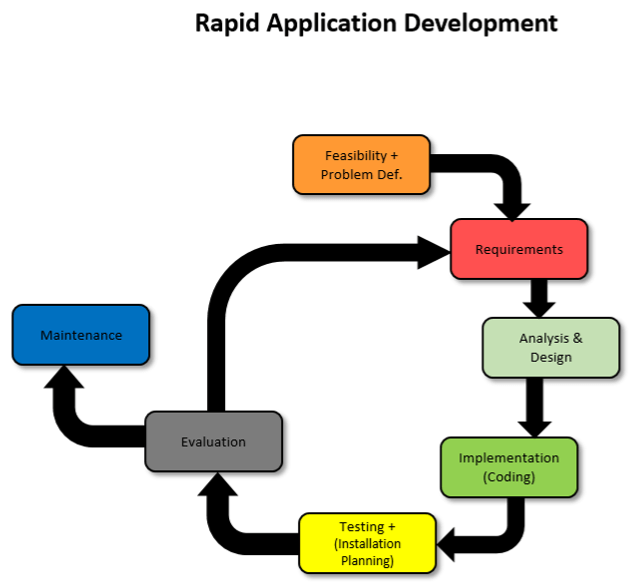
Rapid Application Development:
This is a type of agile model which prioritizes rapid prototype releases and iterations.
There are 5 phases to RAD: Requirement gathering, Prototyping, Gather user feedback, Testing, Deployment.
Requirements: Stakeholders come together to discuss and finalize project requirements such as goals and budget.
Prototyping: Designers work closely with clients to create and improve working prototypes.
User Feedback: Prototypes are converted into working models and user feedback is received to tweak and improve prototypes to create the best possible product.
Testing: In this phase you need to test your product, making sure everything works according the customers expectations. The continuation of incorporating user feedback into the redesign and testing is also taking place.
Deployment: This is where the product is released and shown to the consumers.
Advantages:
- User feels involved.
- End product more likely to match requirements.
Disadvantages:
- Regular contact needed with client.
- Does not scale well to large projects.
- Not suitable if efficiency of code is priority.
 Computer Science Notes